Comparing Data Annotation Platforms for Format Standardization
· Data Annotation
Compare platforms by format support, export options, automation, and integrations to standardize annotations across visual, 3D, and medical datasets.
Comparing Data Annotation Platforms for Format Standardization
When choosing a data annotation platform, standardizing formats is critical for consistent, high-quality AI training. This article compares Roboflow, Label Studio, SuperAnnotate, BasicAI, and V7, focusing on their ability to handle diverse data types, export formats, and integration capabilities. Here's a quick breakdown:
- Roboflow: Offers 40+ export formats (e.g., YOLO, COCO), strong API/SDK support, and automation tools for seamless visual data workflows.
- Label Studio: Open-source and supports multiple data types, with customizable workflows via Python SDK, but advanced features may require setup.
- SuperAnnotate: Best for large-scale visual data projects with ML pipeline integration but limited for text/audio tasks.
- BasicAI: Focuses on 3D annotation and sensor fusion for autonomous systems, though it has a steeper learning curve.
- V7: Excels in medical imaging with advanced tools for 3D data but may lag with large datasets.
Quick Comparison
| Platform | Export Formats | Data Types Supported | Key Features | Limitations |
|---|---|---|---|---|
| Roboflow | YOLO, COCO, Pascal VOC | Visual data (images, video) | Automation, cloud integration | Limited to visual data |
| Label Studio | JSON, CSV, CONLL2003 | Images, text, audio, video | Customizable workflows, open-source | Setup required for advanced features |
| SuperAnnotate | Limited (e.g., COCO) | Visual data, LiDAR | ML integration, quality control | Weak in text/audio support |
| BasicAI | PCD, BIN, 2D/3D formats | 3D, sensor fusion | Fast annotation, enterprise-ready | Challenging for new users |
| V7 | DICOM, NIfTI, others | Medical imaging | Auto-segmentation, 3D tools | Performance issues with large data |
Each platform has strengths tailored to specific use cases. If you work with visual data, Roboflow or SuperAnnotate may suit your needs. For diverse data types, Label Studio is a flexible option. For medical imaging or 3D projects, V7 and BasicAI stand out. Choose based on your data's complexity and workflow requirements.
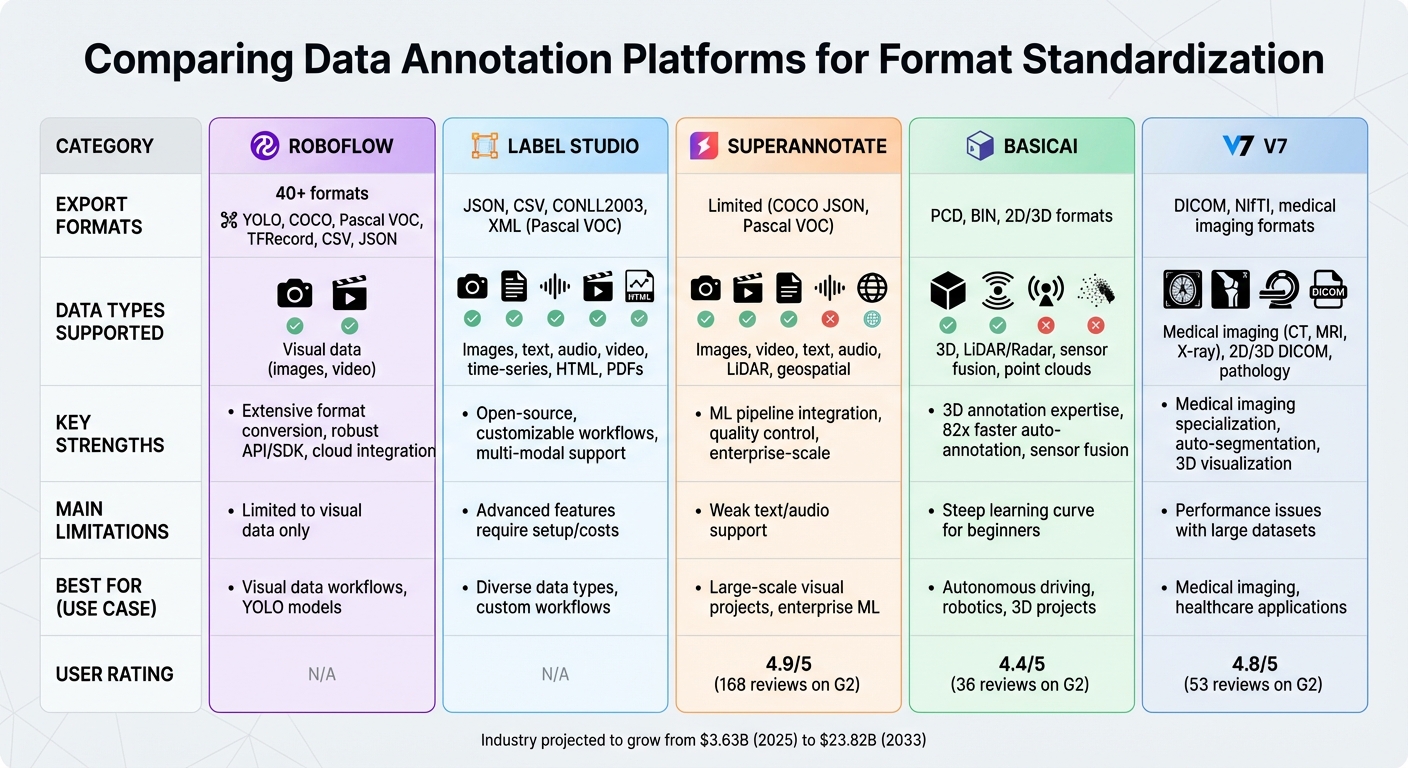
Data Annotation Platform Comparison: Features, Formats, and Use Cases
1. Roboflow
Supported Formats
Roboflow supports exporting annotated data in over 40 formats, including COCO JSON, YOLO PyTorch TXT, Pascal VOC, and CreateML. It accommodates various annotation types, such as bounding boxes, polygons, segmentation masks, keypoints, and classification labels. This flexibility ensures compatibility with different model architectures and training workflows.
Conversion Automation
Roboflow's Auto Label workflow leverages foundation model predictions to label thousands of images in batches. Users can fine-tune the process by adjusting confidence thresholds for each class, giving them greater control over the automatic labeling. Additionally, the Autodistill feature converts unlabeled images into formats compatible with specific models (like YOLOv8), minimizing the need for manual labeling.
Pipeline Integration
With its SDKs and API, Roboflow enables programmatic access to datasets and automates conversion workflows. This makes it possible to streamline everything from annotation to model training, while seamlessly connecting with popular machine learning frameworks and cloud storage services. For teams working with YOLO models, Roboflow offers simplified integration paths that make deployment more efficient. These features provide a solid starting point as we move on to the next platform.
2. Label Studio
Supported Formats
Label Studio focuses on handling multiple data types rather than offering an exhaustive list of formats. It supports images, video, text, audio, time-series data, HTML documents, and PDFs through XML-based custom annotation interfaces. For exporting, it provides options like JSON, CSV, and CONLL2003, commonly used for Named Entity Recognition tasks. While this range may seem limited compared to Roboflow's 40+ formats, Label Studio's Python SDK allows teams to create custom output structures, adding a layer of adaptability. Additionally, the community benefits from LabelImg's support for XML (Pascal VOC) and YOLO formats, enhancing its compatibility.
Conversion Automation
Label Studio leans on AI-assisted labeling to jumpstart annotations rather than focusing solely on format conversion. By connecting its ML Backend SDK to custom models, the platform can generate pre-labeling suggestions and enable active learning loops, speeding up the annotation process. While automating format conversion is possible, it requires some technical setup through the Python SDK. This capability ensures smoother integration into broader workflows.
Pipeline Integration
With its REST API and ML Backend SDK, Label Studio offers programmatic access to datasets and supports custom model deployment. These tools make it easy to connect the platform with cloud storage solutions and embed it into existing machine learning pipelines. This integration helps maintain consistent outputs for standardized formats. However, advanced features like enhanced security, detailed reporting, and more robust integrations may require additional setup or the enterprise version.
Multi-Modal Support
One of Label Studio's standout features is its ability to handle various data types within a single platform. Using XML templates, it provides customizable interfaces tailored to different projects. This flexibility makes it a strong choice for teams managing diverse datasets. However, as Unitlab AI notes, this adaptability often comes with the need for technical setup, especially for more complex workflows.
3. SuperAnnotate
Supported Formats
SuperAnnotate is built to handle large-scale, multimodal datasets, accommodating a variety of data types. It supports images (including high-resolution satellite imagery), video, text (transcriptions and segmentations), audio (transcriptions and segmentations), LiDAR point clouds, and geospatial tiles. Its capabilities have earned it a 4.9/5 rating from 168 reviews on G2, where it's praised as the top data labeling platform. However, documentation on export formats like COCO JSON and Pascal VOC is somewhat limited.
Conversion Automation
When it comes to format conversion, SuperAnnotate leans heavily on AI-assisted labeling rather than automated format conversion. Using SAM technology, including Magic Select and superpixel AI, the platform speeds up annotation and supports standardization across platforms. That said, it doesn’t provide specific tools for converting between standardized formats like COCO and Pascal VOC. These decisions highlight its focus on streamlining annotation processes rather than format conversion.
Pipeline Integration
SuperAnnotate integrates smoothly into CI/CD pipelines with its orchestration module, offering native connectors for platforms like Databricks, AWS, Snowflake, and Slack. Developers can also take advantage of its Python SDK, APIs, and webhooks for model inference and training. Features like dataset versioning, audit trails, and quality assurance workflows ensure consistent data formatting and provide teams with better control. The product team continues to refine these features to improve usability.
Multi-Modal Support
This platform is designed to handle complex enterprise-level use cases within a unified environment. It supports tasks ranging from standard image annotation to more specialized processes like LiDAR point cloud analysis and geospatial tile management. Users appreciate its strong data management tools, progress tracking, and comprehensive support. Additionally, its data security and governance capabilities make it a dependable option for enterprises with diverse and demanding annotation needs.
4. BasicAI
Supported Formats
BasicAI, also known as Xtreme1, is a cloud-based MLOps platform designed for data-centric workflows, with a strong focus on 3D annotation for fields like autonomous driving and robotics. It supports a wide range of formats, including PCD and BIN for point clouds, alongside standard 2D and 3D images, LiDAR/Radar data, video, and audio files. This flexibility makes it a great choice for projects that rely on sensor fusion. Users on G2 have rated the platform 4.4 out of 5 across 36 reviews, often highlighting its ease of use and quality. Its ability to handle diverse formats helps streamline annotation processes efficiently.
Conversion Automation
The platform’s automation tools are geared toward speeding up annotation tasks rather than format conversions. Its auto-annotation features are 82 times faster than manual methods, with sensor fusion tasks completed 72% faster. Tools like auto-segmentation, human–machine collaboration, and automatic 3D object tracking simplify workflows and save significant time during the labeling process.
Pipeline Integration
BasicAI integrates effortlessly with machine learning frameworks, supports continuous training, and can handle massive datasets - processing over 150 million points across 300 frames. Teams can incorporate pre-trained models, and the platform’s custom export options ensure smooth data transfer into training pipelines. Available in both cloud and enterprise deployment options, BasicAI is well-suited for tasks like object and lane detection, object tracking, and semantic segmentation. These integration capabilities make it a strong choice for multi-modal applications.
Multi-Modal Support
The platform excels in sensor fusion, synchronizing 3D LiDAR and 2D camera data in real time. This feature is particularly beneficial for autonomous driving and robotics projects. However, some users mention that the platform can be challenging for beginners, requiring prior knowledge and training to navigate effectively. While the support team is responsive and helpful, users have expressed a desire for improved compatibility with lower-end hardware. Despite these hurdles, BasicAI’s robust features ensure consistent data conversion and integration, which are vital for producing standardized outputs.
sbb-itb-cdb339c
5. V7
Supported Formats
V7 Darwin is equipped to handle a wide range of visual and medical imaging data types. From standard images and videos to specialized medical formats, it excels in processing 2D and 3D DICOM files, NIfTI files, and whole slide images used in digital pathology. Healthcare professionals can annotate various medical imaging modalities, including CT scans, MRIs, X-rays, ultrasounds, pathology slides, and fluoroscopy data. The platform even supports voxel annotations for 3D medical data, making it a go-to tool for applications in healthcare and life sciences.
Conversion Automation
V7 simplifies the annotation process with its automation tools. The Auto-Annotate feature uses deep learning models to segment images and generate polygon masks automatically. For video-related tasks, the Auto-track function handles object tracking across frames efficiently. In medical imaging workflows, tools like MedSAM and SAM2 video auto-tracking ensure consistent and accurate annotations. These automated capabilities not only save time but also enhance the efficiency of machine learning workflows.
Pipeline Integration
V7 is designed to seamlessly integrate into machine learning workflows. It supports neural network training and offers tools for managing models and datasets, making it easier to organize training sets and track experimental runs. The platform also enables human-in-the-loop processes, allowing teams to use either their own labeling resources or V7's built-in agents for annotations.
Multi-Modal Support
V7 stands out with its ability to handle multiple data channels simultaneously, which is especially useful for complex medical studies. Features like multi-planar reconstruction, 3D visualization, color overlays, and window controls make it a robust choice for advanced imaging protocols. Users have rated V7 highly, with a 4.8 out of 5 rating on G2 based on 53 reviews, where it is recognized as the "2nd Easiest To Use" data labeling software. While many users praise its auto-segmentation tools for saving time, some have noted occasional lag when managing large datasets and inconsistencies in billing. To meet strict compliance needs, V7 also offers hybrid and on-premises deployment options for enterprise users.
10 best annotation tools for computer vision applications
Strengths and Weaknesses
Roboflow shines with its wide-ranging format support, offering exports in formats like YOLO, COCO, Pascal VOC, TFRecord, CSV, and JSON. It also simplifies format conversion and integrates seamlessly with cloud storage platforms such as AWS S3, Google Cloud Storage, and Azure, making it highly adaptable across platforms.
Label Studio provides exceptional flexibility as an open-source tool, supporting various data types including images, video, text, audio, and time-series data - all within one interface. Its XML-based annotation customization allows teams to tweak workflows to fit specific requirements. However, advanced integrations often come with extra costs or require additional setup.
SuperAnnotate is well-suited for machine learning workflows and excels in handling images and videos. That said, it falls short when it comes to non-visual data types like text and audio, which might necessitate supplementary tools for teams working with diverse datasets.
Choosing the right tool often hinges on understanding these nuances. Here's a quick comparison to help clarify the strengths and weaknesses of each platform, especially in terms of cross-platform format compatibility:
| Platform | Key Strengths | Main Limitations |
|---|---|---|
| Roboflow | Extensive format conversion, robust API/SDK, cloud storage integration | Primarily focused on visual data |
| Label Studio | Open-source, supports multiple data types, customizable workflows | Advanced features may require extra setup or costs |
| SuperAnnotate | Strong ML pipeline integration, effective for visual data | Limited support for text and audio |
| BasicAI | Expertise in 3D annotation, sensor fusion capabilities | Steeper learning curve for new users |
| V7 | Specializes in medical imaging, automated annotation tools | Performance issues with large datasets |
When deciding, consider the nature of your data and your integration requirements. For teams working primarily with visual data, SuperAnnotate might be the simplest choice. On the other hand, those needing support for multiple data types may lean toward Label Studio or Roboflow, though they should plan for possible additional configurations.
Conclusion
When it comes to choosing the right data annotation platform for format standardization, the key is matching the platform's technical capabilities to your project's specific needs. For instance, Roboflow provides strong format conversion options, supporting exports in YOLO, COCO, and Pascal VOC formats. On the other hand, Label Studio stands out for its open-source flexibility, making it ideal for teams handling diverse data types such as images, video, text, audio, and time-series data - though some advanced features may require additional configuration.
The data annotation industry is experiencing rapid growth, with forecasts suggesting an increase from $3.63 billion in 2025 to $23.82 billion by 2033. This surge highlights the growing importance of platforms equipped with features like pre-labeling, active learning, and automation. For industries with strict regulations, it's crucial to focus on platforms offering governance tools such as role-based access control (RBAC), audit trails, and compliance with standards like HIPAA or SOC 2.
To minimize manual work, look for platforms that support popular data formats and include automated conversion tools like Python SDKs, REST APIs, or CLI utilities. Ultimately, the best platform is the one that aligns with your data requirements and integrates smoothly into your existing workflows.
For more detailed insights and the latest updates on data annotation platforms, check out Data Annotation Companies.
FAQs
What should I consider when selecting a data annotation platform for my project?
When selecting a data annotation platform, it's essential to ensure it supports the specific data types and tasks you work with - whether that's text, images, or video. Features like automation tools, collaboration functionalities, and strong security protocols can help streamline your workflows while keeping your data safe. If your project is likely to expand, scalability should also be a top consideration.
You’ll also want to evaluate how well the platform integrates with your current tools and processes. A seamless integration can prevent disruptions and save valuable time. Additionally, a user-friendly interface can make a big difference by reducing the learning curve for your team, allowing them to adapt quickly. By focusing on these factors, you can choose a platform that not only fits your present needs but also grows with your future demands.
How do Roboflow and Label Studio differ in their approach to data annotation?
Roboflow delivers an AI-driven workflow tailored for computer vision projects. With features like pre-tagging and dataset versioning, it’s built to handle large-scale tasks efficiently, making it a strong choice for enterprises prioritizing speed and streamlined operations.
Label Studio stands out as an open-source platform offering a high degree of customization. It supports various data types, making it a great fit for teams seeking adaptable workflows and the flexibility to adjust tools to meet specific project needs.
Do these platforms work well with non-visual data types?
Many data annotation platforms are built to work seamlessly with non-visual data types. They can handle formats like text, audio, and video, often using standards like JSON or XML for annotations. These platforms usually come equipped with specialized tools to ensure precise labeling across various data types, making them suitable for diverse applications.