Cost Breakdown: Long-Term Pricing for Annotation Platforms
· Data Annotation
Compare subscription, credits and pay-as-you-go annotation pricing, hidden fees, and scalability impacts to plan accurate long-term labeling budgets.
Cost Breakdown: Long-Term Pricing for Annotation Platforms
Choosing the right annotation platform can make or break your AI project's budget. Here's what you need to know:
- Costs can escalate quickly as projects scale. Annotation alone can consume up to 80% of your machine learning budget.
- Hidden fees matter. Quality control, project management, and storage fees often add 10–20% to costs.
- Subscription vs. pay-as-you-go: Subscription models (e.g., Unitlab, Roboflow) can save 20–50% but only if aligned with your workflow. Usage-based pricing (e.g., Scale AI, LabelBox) offers flexibility but can lead to unpredictable expenses.
- Specialized needs increase costs. Features like on-premises deployment, multilingual annotations, or advanced support often require custom plans or add-ons.
Quick Comparison
| Platform | Pricing Model | Key Features | Hidden Costs | Best For |
|---|---|---|---|---|
| Unitlab | Tiered subscription | Managed services, AI tools | Annotation complexity adds cost | Small-to-medium CV projects |
| Roboflow | Credits-based | AI labeling, flexible scaling | Storage fees, credit overages | Teams with fluctuating workloads |
| LabelBox | LBU-based | Unified platform for all tasks | Storage and complex data fees | Diverse data types, enterprise |
| Scale AI | Pay-as-you-go/Custom | Managed workforce, automation tools | Language multipliers, setup fees | High-volume AI initiatives |
| SuperAnnotate | Tiered subscription | Compute hour-based, marketplace | Exceeding compute hours | Multimodal data, automation |
| DataLoop | Custom subscription | Serverless automation, unified billing | Idle hours, API usage | Complex workflows, automation |
Key Takeaway
Start small with trials or free tiers to assess fit and costs. Plan for growth by choosing a platform that aligns with your long-term data needs and budget constraints. Hidden fees like storage, unused quotas, or premium support can add up, so monitor these closely.
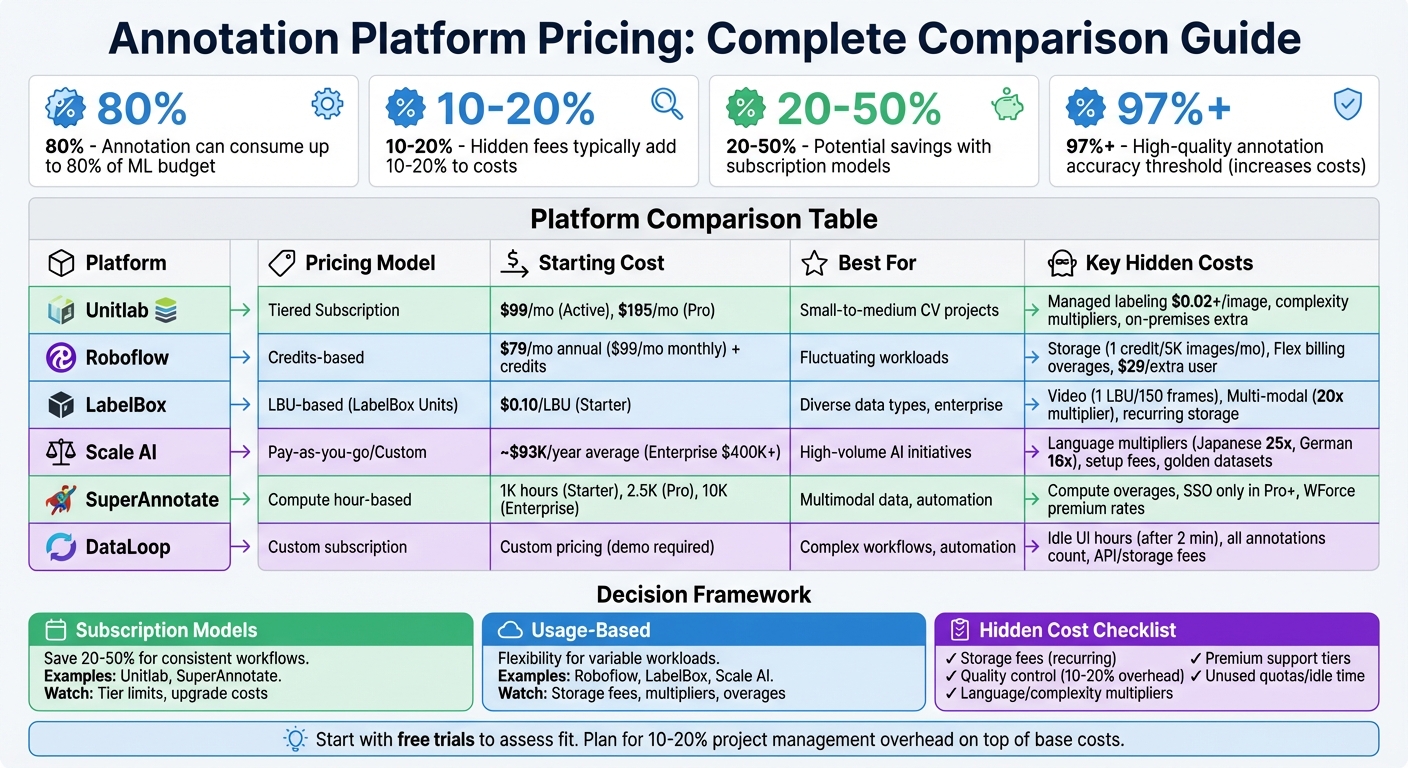
Annotation Platform Pricing Comparison: Features, Costs, and Hidden Fees
1. Unitlab
Pricing Model
Unitlab offers four subscription tiers to cater to different needs: Free, Active ($99/month), Pro ($195/month), and Enterprise (custom pricing). Each tier comes with specific limits on team members, source images, and auto-labeling actions. For instance, the Free plan allows up to 3 team members and 5,000 source images, while the Active plan supports 5 members and 10,000 images per month. If you opt for annual billing, you can save around 20%, dropping the Active plan to $89/month and the Pro plan to $180/month. Beyond subscription access, Unitlab also provides managed labeling services starting at $0.02 per image. Final costs for these services depend on factors such as annotation complexity and object density.
Scalability
Unitlab's scalability revolves around monthly limits for source images and auto-labeling credits. These limits determine when you might need to upgrade your plan. All tiers include unlimited workspaces and projects, which adds flexibility. For example, if you exceed the Active plan's 10,000-image limit, you can move up to the Pro plan, which supports 25,000 images per month, or choose the Enterprise tier for unlimited images. Unitlab claims its AI tools can speed up annotation tasks significantly, reducing the time to label 1,000 images from 10 hours to just 30 minutes - an impressive 15x improvement.
Hidden Costs
While subscription fees are straightforward, there are additional costs to consider. Managed labeling services start at $0.02 per image, but prices can rise based on the complexity of annotations and the density of objects in the images. For Enterprise users, on-premises deployment isn't included in the standard plans and requires a separate consultation and purchase. Support availability also varies by tier: the Active plan offers 7-day support, while Pro and Enterprise tiers include 24/7 support.
Project Suitability
The suitability of Unitlab for a project often depends on cost and precision requirements. The platform is particularly effective for computer vision projects like autonomous vehicles, medical imaging, or agricultural crop monitoring - areas where precision and version control are critical. Unitlab boasts a two-layer quality assurance process that achieves an accuracy rate exceeding 99%. Additionally, managed labeling projects typically kick off within 48 hours of finalizing the requirements.
"We work with projects of all sizes - from small proof-of-concept datasets to full production-scale annotation. There's no strict minimum on volume."
- Unitlab Labeling Service FAQ
For teams handling sensitive data, the Enterprise tier offers an on-premises deployment option, ensuring that your annotation system stays securely within your local environment.
2. Roboflow
Pricing Model
Roboflow offers a hybrid pricing system, blending monthly or annual subscriptions with a credit-based structure tied to actual usage. The platform provides three primary tiers: Public (free for open-source projects), Core ($79/month when billed annually or $99/month), and Enterprise (custom pricing). Nearly every action - such as data storage, AI labeling, model training, and deployment - consumes credits, which are deducted from your balance.
Credits are priced at $3 each on annual plans and $4 each on monthly plans, making the annual option 25% cheaper. The Core plan includes $60 worth of credits each month, which resets with every billing cycle. Users can purchase additional Prepaid Credits (which never expire) or enable Flex Credits, which activate automatically and are billed monthly as needed. For reference, storing 5,000 images requires 1 credit per month, while AI-assisted labeling uses 1 credit for every 100 images.
Scalability
The credit-based system allows Roboflow to scale with your project’s activity, rather than imposing rigid feature limits. The Public plan includes 2 users and supports up to 250,000 images, while the Core plan accommodates up to 10 users (3 included, with additional seats costing $29/user/month) and offers unlimited pay-as-you-go image storage. For larger operations, the Enterprise tier removes user restrictions entirely and provides advanced infrastructure options like managed GPU clusters and offline deployment.
Annual subscribers benefit from upfront access to all credits, enabling them to manage seasonal spikes without interruption.
"Achieving positive results using AI in a lab environment is easy, but the real challenge comes when scaling the solution across a network like ours without disrupting day-to-day operations. Our partnership with Roboflow is allowing us to do just that." - Asim Ghanch, AVP of Technology at BNSF
However, this flexibility comes with potential hidden costs, which may vary depending on your monthly usage.
Hidden Costs
While the credit system provides flexibility, it can lead to unpredictable monthly expenses. Storage fees are a recurring cost - 1 credit per 5,000 images stored monthly - which can add up for large datasets. Flex billing is enabled by default to prevent service interruptions, but it may result in unexpected charges if you exceed your credit balance. Users can disable Flex billing in the settings, but doing so will halt features once credits are depleted.
Additional user seats on the Core plan cost $29/month each, and the plan caps at 10 users before requiring an upgrade to Enterprise. Using third-party AI models through Roboflow Workflows (e.g., OpenAI or Anthropic) consumes credits at specific conversion rates, which might not always be as transparent as direct API billing. For managed labeling services, costs start at $0.10 per bounding box and $0.20 per polygon, with Roboflow's team having completed over 10 million annotations to date.
Project Suitability
Roboflow is ideal for teams needing flexible annotation and deployment options. The credit-based system ensures you only pay for what you use, making it a practical choice for projects with fluctuating workloads. For example, model training costs 1 credit per 30 minutes of GPU time, while cloud inference uses 1 credit for every 1,000 predictions. This granular pricing structure allows teams to balance costs effectively by mixing AI-assisted labeling with manual work.
"Partnering with Roboflow has been instrumental in accelerating our learning and deployment of innovative AI solutions to achieve our goal of leading the industry in product quality and delivery for our customers." - Travis Turnbull, Vice President & CIO at Pella Corporation
The Enterprise tier is particularly suited for organizations managing sensitive data or requiring advanced governance tools such as SSO, Role-Based Access Control, and audit logs. However, these features are available as add-ons to the base pricing.
3. LabelBox
Pricing Model
LabelBox uses a unified currency called LBUs (LabelBox Units) across its core features: Catalog, Annotate, and Model. Here’s how the pricing works:
- Catalog: 1 LBU is charged per 60 rows stored monthly.
- Annotate: 1 LBU is used per labeled row, with higher multipliers applied to more complex data types.
- Model: 1 LBU covers 5 rows for model runs.
For the Starter plan, each LBU costs $0.10, with Enterprise plans offering volume discounts as monthly usage increases. This pricing structure was updated in February 2024. Additionally, a Free plan provides 500 LBUs per month, ideal for small-scale testing.
This flexible LBU-based system is designed to adapt as your needs grow, as explained below.
Scalability
LabelBox’s LBU system is built to scale efficiently, especially for larger projects. As data volume grows, Enterprise users benefit from reduced per-unit costs through volume discounts. For complex tasks, the platform integrates with Alignerr, offering access to over 1 million experts for manual labeling. These services start at $10 per hour, ensuring that teams can handle even the most challenging data labeling needs.
Users also get a 7-day grace period for newly uploaded Catalog data - rows deleted within this timeframe won’t consume LBUs unless labeled during that period. To further streamline scaling, automated model-assisted labeling reduces the need for manual effort by pre-labeling data.
While the system is efficient, it’s important to account for potential hidden costs, which can impact long-term budgets.
Hidden Costs
The cost of LBUs varies depending on the type of data being processed. For example:
- Basic images or text: 1 LBU per labeled row in Annotate.
- Multi-Modal and LLM data: 20 LBUs per row.
- Geospatial imagery: 4 LBUs per row.
- Video projects: 1 LBU per row plus 1 LBU per 150 frames for Annotate, and 1 LBU per 5,000 frames monthly for Catalog.
"For Annotate projects, skipped data rows are considered labeled and contribute to LBU." - Labelbox
Foundry inference costs are calculated separately based on data volume and model complexity. Additionally, recurring costs for Catalog storage can add up over time. For instance, storing 5,000 basic images at Starter rates would cost around $8.33 per month.
Project Suitability
Given its pricing and scalability features, LabelBox is particularly well-suited for teams working with diverse data types and requiring flexible, consumption-based pricing. The one-time charges for Annotate and Model make it a cost-effective choice for projects where labeled data is reused across multiple experiments without incurring extra fees.
Teams handling standard images or text will appreciate the straightforward pricing, but those working with video, geospatial, or LLM data should carefully calculate the multiplier costs before scaling.
"Base labeling services start at a flat rate of $10 USD an hour." - Labelbox
For long-term enterprise projects, LabelBox offers advanced governance features, including dedicated support and enhanced security options in its Enterprise plans. However, businesses should factor in recurring Catalog costs when planning multi-year data retention strategies. Deleting unused data rows before the billing cycle ends can help avoid unnecessary LBU consumption.
4. Scale AI
Pricing Model
Scale AI offers two main pricing options tailored to different needs: the Self-Serve Data Engine for experimental and research-focused projects and the Enterprise tier for large-scale, high-volume AI initiatives. The Self-Serve option uses a pay-as-you-go model with credit card billing, while the Enterprise tier involves custom pricing negotiated directly with Scale AI's sales team.
For its Rapid platform, pricing is based on a per-completed-task model. This includes fixed setup costs, variable costs depending on labeler response, and multipliers based on project settings. Self-labeling through Scale Studio provides 200 free labeling units each month, with additional units priced at $0.05 each. The Self-Serve tier also includes generous starting allowances: the first 1,000 labeling units and the first 10,000 images for data management are free. On average, annual contracts cost around $93,000, with some Enterprise deals exceeding $400,000.
Scalability
Scale AI's flexible pricing and tools make it easy to transition from small experiments to full-scale production. One standout feature is its data curation capability, which ensures labeling efforts focus on high-value data, reducing unnecessary processing.
"The Autotag functionality in Data Engine: Dataset Management helps us immensely by identifying examples of infrequent scenarios in our dataset... we depend on tools like Scale Data Engine: Dataset Management to curate edge cases." - Jack Guo, Head of Autonomy Platform, Nuro
Users can choose between Scale's managed workforce or their own team via Scale Studio. For ongoing production, a smaller, consistent annotator team often delivers better results. Meanwhile, irregular or short-term projects benefit from a larger workforce to handle surges.
Hidden Costs
While flexible, variable pricing can lead to unexpected expenses. Language fluency multipliers for text-based tasks, for example, can significantly increase costs. Here's a breakdown of some key multipliers:
| Language | Basic Multiplier | Intermediate Multiplier | Expert Multiplier |
|---|---|---|---|
| English | 1.00 | 2.50 | 7.00 |
| Spanish | 3.00 | 3.75 | – |
| Chinese Simplified | 7.50 | 9.38 | – |
| German | 16.00 | 20.00 | – |
| Japanese | 20.00 | 25.00 | – |
For instance, expert-level tasks in Japanese can cost up to 25 times the base rate. Additional costs may include building and maintaining "golden datasets" for quality checks, which require dedicated engineering resources. Adding review tiers - where senior reviewers verify work - can also slow down throughput and increase the per-label cost.
Since Rapid pricing depends on data complexity, businesses are encouraged to use the Price Estimator tool on the dashboard to predict costs before starting large-scale projects. This dynamic pricing model requires careful planning to avoid overspending as projects grow.
Project Suitability
Scale AI is ideal for teams needing flexible workforce options and support for diverse data types, including images, video, text, and 3D sensor fusion. It’s particularly effective for organizations aiming to scale with high-quality outputs through a combination of machine learning-powered pre-labeling and human review.
"After training for years to do this research, it was frustrating how much time I was spending just annotating data. Working with Scale Rapid freed up my time to work on the parts of research that require my expertise." - Caleb Weinreb, Neuroscience Post-Doc, Harvard Medical School
For teams working with multilingual content, factoring in language multipliers is crucial when planning budgets for long-term projects. A practical approach is to self-label initial batches to set quality benchmarks, then outsource regular production to Scale's professional workforce. For enterprise-level deployments requiring dedicated support and full access to the GenAI Platform, the Enterprise tier provides the necessary infrastructure, though at a higher cost compared to Self-Serve options.
5. SuperAnnotate
Pricing Model
SuperAnnotate offers a tiered subscription model with three plans: Starter, Pro, and Enterprise. Each plan is designed to meet different project needs and includes a set number of compute hours - Starter provides 1,000 hours, Pro offers 2,500 hours, and Enterprise includes 10,000 hours. The Starter plan covers essentials like a multimodal editor, curation tools, and basic analytics. The Pro plan steps it up with features like Single Sign-On (SSO), a dedicated Slack channel, and access to a Customer Success Manager. For those requiring advanced support, the Enterprise plan includes technical assistance from a Solutions Engineer, AI DataOps consulting, and enhanced analytics. A free version is also available.
The platform integrates the WForce marketplace, giving users on-demand access to professional annotation teams. This feature enhances flexibility and has earned SuperAnnotate a top rating of 4.9 out of 5 stars on G2, where it is ranked as the #1 Data Labeling platform.
The allocation of compute hours plays a major role in long-term cost management. This structured pricing approach ensures that the platform can scale alongside your data needs.
Scalability
SuperAnnotate's tiered pricing is designed to grow with your compute requirements. As your automation needs expand, upgrading to a higher tier is straightforward and doesn’t disrupt existing workflows. The platform’s Python SDK makes it easier to manage larger datasets programmatically, cutting down on manual work.
The WForce marketplace further boosts scalability by providing access to professional annotation teams when needed. This eliminates the need for permanent hires during busier periods. Users have reported significant time savings, with annotation processes becoming three times faster and model development timelines halved.
"Two years ago, our team consisted of four people who were doing a thousand images over two months. Our data scientist is doing the same amount of work today in just one week. So, if I take 4x8, we get effectively nearly 32x faster." - Geoffrey Shmigelsky, CTO, OneCup AI
At Percepto, Ovadya Menadeva, Head of AI and Vision, achieved a 60% reduction in annotation cycle times, cutting the process from over a week to just a couple of days by utilizing SuperAnnotate's trained annotation teams.
Hidden Costs
While the subscription model is clear, there are potential hidden costs to consider. Exceeding the allocated compute hours could require an upgrade, often bundling features that may not be immediately necessary. For example, advanced features like SSO are only available starting with the Pro plan. Teams with strict security needs might find themselves upgrading to access this single feature. Similarly, premium support options - ranging from a dedicated Slack channel and Customer Success Manager in the Pro plan to a Solutions Engineer and AI DataOps consulting in the Enterprise plan - are tier-dependent.
| Feature | Starter | Pro | Enterprise |
|---|---|---|---|
| Compute Hours | 1,000 | 2,500 | 10,000 |
| SSO | Not included | Included | Included |
| Support | Platform onboarding | Dedicated Slack & CSM | Dedicated Solutions Engineer |
| Consulting | Not included | Not included | AI DataOps consulting |
On-premise deployment is another area where additional costs can arise. These deployments require separate infrastructure and maintenance, which fall outside the standard SaaS pricing. Specialized annotation services - such as those requiring medical or legal expertise via the WForce marketplace - also come at a premium compared to standard labeling rates.
Project Suitability
SuperAnnotate shines in practical applications, particularly for teams transitioning from manual annotation to model-assisted workflows. Its model-in-the-loop functionality allows annotators to focus on reviewing model predictions rather than creating labels from scratch. This approach speeds up workflows and lowers costs.
"SuperAnnotate's platform is incredibly robust and easy-to-use. Their Data Operations team is very thorough, proactive, easy to engage, and acts as a valuable extension of Motorola Solutions' data operations." - Jason Lohner, Senior Manager, AI Data, Motorola Solutions
The platform is especially effective for organizations handling multimodal data - spanning images, video, and text - and tackling complex AI projects with demanding MLOps requirements. For companies aiming to optimize costs over time, SuperAnnotate’s mix of automation tools and marketplace services can deliver up to 12x cost efficiency compared to manual annotation methods.
sbb-itb-cdb339c
6. DataLoop
Pricing Model
DataLoop operates on a subscription model with pricing tailored to each client, determined during a specialist demo. The cost is calculated based on three main metrics: UI Hours (tracking how long the studio is actively used), Managed Datapoints (each file or annotation is counted as a unit), and Serverless Automation (compute usage billed within a set budget). All usage is aggregated across projects, allowing for consolidated billing. This also helps track peak usage, referred to as "Managed Datapoints [Max]", which is essential for long-term resource planning.
Scalability
DataLoop’s billing model is designed to support growth by merging usage from all projects into a single account. The platform enables scalability through custom automation pipelines built in a serverless environment. Its Serverless Automation feature ensures compute resources stay within a predefined budget, while detailed monthly tracking helps avoid unexpected overages. Email alerts are sent at 80%, 90%, and 100% of the allocated budget to prevent disruptions.
"Working with Dataloop has proven to save Odysight.AI significantly in regards to money and time, by automating once tedious data-engineering and models' evaluation procedures." - Yishaia Zabary, Senior Data Scientist, Odysight.AI
While these features support scaling, users should be aware of potential hidden costs.
Hidden Costs
DataLoop’s pricing structure includes some elements that could lead to unexpected expenses. For instance, idle UI Hours start accumulating after just two minutes of inactivity, so annotators need to close the studio when not in use. Additionally, Managed Datapoints count all annotations, including those that are hidden, deleted, or archived, which can still consume your quota. Other extra charges may arise from API calls, storage usage, and GPU/CPU hours. If your subscription expires or resource limits are exceeded, key actions like uploading data, annotating items, or running compute executions will be restricted. Although System Compute is provided for onboarding tasks, Serverless Automation requires a dedicated compute budget to operate.
Project Suitability
DataLoop is particularly well-suited for complex projects that demand advanced automation and large-scale unstructured data management. The platform shines in automating workflows to reduce manual effort, making it a strong choice for teams working on autonomous driving, ADAS, or other computer vision applications requiring ongoing model evaluation.
"The team at Dataloop provide a powerful platform with a suite of tools. Thanks to Dataloop, we're able to successfully test our algorithms and improve our ADAS and autonomous driving features." - David Lempert, Head of R&D
Organizations can either manage their own workforce or utilize integrated labeling services, which may impact the total UI Hours billed. Given the custom pricing structure, it’s a good idea for potential users to work directly with DataLoop’s sales team to evaluate whether the platform fits their budget and project requirements.
Data Annotation Tech Review (2026): Is The $20 Hourly Rate Still Consistent?
Advantages and Disadvantages
Different platforms come with their own cost structures, each suited to specific needs. Unitlab, for instance, offers fixed monthly fees that work well for smaller teams with consistent workflows. However, as your data needs grow, its tiered limits may require you to upgrade. On the other hand, Roboflow uses a credit-based pricing model that adjusts with your usage. While this offers flexibility, it can lead to fluctuating monthly expenses.
If you're working at an enterprise scale, Labelbox provides volume discounts, but you’ll need to watch out for recurring storage fees if your datasets aren’t actively managed. Scale AI is a solid choice for large-scale projects like autonomous driving or strategic AI initiatives, but keep in mind that Enterprise contracts reportedly start at $50,000. Meanwhile, SuperAnnotate calculates costs based on compute hours (ranging from 1,000 to 10,000 hours across its tiers) rather than data volume. However, onboarding and support fees may add to the total cost. Finally, DataLoop offers a comprehensive AI lifecycle management solution, but its custom Enterprise plans require direct engagement with their sales team.
These pricing models highlight the balance teams must strike between predictability and flexibility. Fixed subscriptions provide budget stability but can limit scalability, while usage-based models give you room to grow but require careful cost tracking. For teams handling large datasets over time, recurring storage fees can become a significant expense, whereas one-time labeling fees are easier to manage.
It’s also worth noting that project management overhead typically accounts for 10–20% of total annotation costs. Additionally, if your project demands high-quality annotations (97%+ accuracy), expect those costs to rise significantly compared to standard quality levels. Teams should carefully assess whether to outsource annotation services or manage the process in-house, as this decision will directly impact the overall project budget.
Conclusion
When selecting a pricing model for your project, it's essential to align it with the scale and workflow of your operations. Some platforms cater to smaller teams with predictable pricing, while others offer volume discounts tailored to large-scale needs.
However, pricing isn't just about the base rates. The broader cost ecosystem plays a significant role. Annotation costs can quickly add up. Toshiyuki Kita, VP of Engineering at Nextremer, cautions: "It is dangerous to choose an annotation company on the basis of cost alone. The quality of the annotation is directly impacted by the accuracy of the AI system". Additional expenses, like project management overhead, can increase costs by 10–20%, and achieving higher-quality annotation (97%+ accuracy) may require further investment.
Before committing to a long-term contract, take advantage of free pilots and trials to assess quality and fit. For ongoing research and development with evolving datasets, subscription models often provide 20–50% savings compared to one-time project pricing.
Be mindful of hidden costs such as storage fees, unused quotas, and label inflation. Geographic considerations also matter - offshore services may reduce hourly rates, but onshore handling might be necessary for sensitive projects.
Ultimately, managing costs effectively means matching your project’s specific demands with the right pricing structure. Start small to validate quality and cost efficiency, then scale as needed, ensuring the platform you choose aligns with your dataset size, quality requirements, and support needs.
FAQs
What hidden costs should I consider when using annotation platforms?
When selecting an annotation platform, it's essential to consider hidden costs that could strain your budget and disrupt project timelines. One significant issue is internal rework costs. Engineers often spend as much as 25% of their time fixing mistakes in poorly annotated data from low-cost providers. This not only slows down progress but also drives up labor costs.
Another critical factor is data leakage, which can undermine the reliability of your AI models and result in expensive errors later on. Prioritizing secure processes and high-quality annotations from the outset can help you avoid these pitfalls, saving both time and resources.
Should I choose a subscription or pay-as-you-go pricing model for my annotation projects?
When deciding between a subscription model and a pay-as-you-go model, it’s essential to think about the size, frequency, and consistency of your annotation projects.
If you’re managing large-scale or ongoing projects with steady annotation needs, the subscription model might be your best bet. It typically offers lower rates and fixed monthly costs, which can simplify budgeting. This model is a smart choice if you’re planning to handle significant data volumes over an extended period and need consistent support.
On the flip side, the pay-as-you-go model is ideal for smaller, one-off, or irregular projects. With this option, you only pay for what you use, making it a more cost-effective solution for short-term or experimental tasks. It’s a flexible approach if your project’s requirements are unpredictable or limited.
Ultimately, weigh your project’s workload, financial constraints, and future goals to decide which pricing structure fits your needs best.
What should I consider when choosing an annotation platform for tasks like multilingual support or secure on-premises deployment?
When choosing an annotation platform for specialized needs like multilingual support or on-premises deployment, there are several factors to keep in mind.
For multilingual annotations, the platform should support a variety of languages and include tools tailored for language-specific tasks, such as natural language processing (NLP). Features like multi-annotator workflows and tools for managing quality are crucial to ensure your annotations remain accurate and consistent across languages.
When it comes to on-premises deployment, it's important to confirm that the platform can function securely within a private environment. This is especially vital if you're working with sensitive data or need to meet strict compliance regulations. Look for platforms that integrate seamlessly with your existing IT setup, offer scalability to accommodate project growth, and provide customization options to address your specific requirements. Don’t forget to evaluate the long-term costs, including maintenance and support, to ensure the platform fits within your budget while maintaining strong data security.