How to Ensure Dataset Compatibility Across Platforms
· Data Annotation
Standardize formats, validate schemas, and automate conversions to ensure datasets run reliably across AI platforms.
How to Ensure Dataset Compatibility Across Platforms
Ensuring your datasets work across platforms involves aligning formats, schemas, and metadata to avoid errors, crashes, or processing failures. Here's a quick breakdown of how to achieve this:
- Understand Platform Requirements: Check file types, size limits, and encoding rules for platforms like Amazon SageMaker, Google Vertex AI, and DataRobot.
- Standardize Data Formats: Use efficient formats like CSV, JSON, or Parquet depending on dataset size and structure.
- Validate Schemas: Define and check schemas to prevent ingestion errors and ensure compatibility.
- Handle Annotations Properly: Standardize annotation formats (e.g., COCO JSON, Pascal VOC) and use tools for conversions.
- Convert Formats Correctly: Use libraries like Hugging Face
datasetsto transform data while maintaining integrity. - Test on Target Platforms: Run small-scale tests to catch issues early, like file size or schema mismatches.
- Automate Pipelines: Use tools like Apache Airflow to streamline data preparation and validation.
How to Convert Any Dataset to DPO Dataset
Step 1: Check Platform Requirements
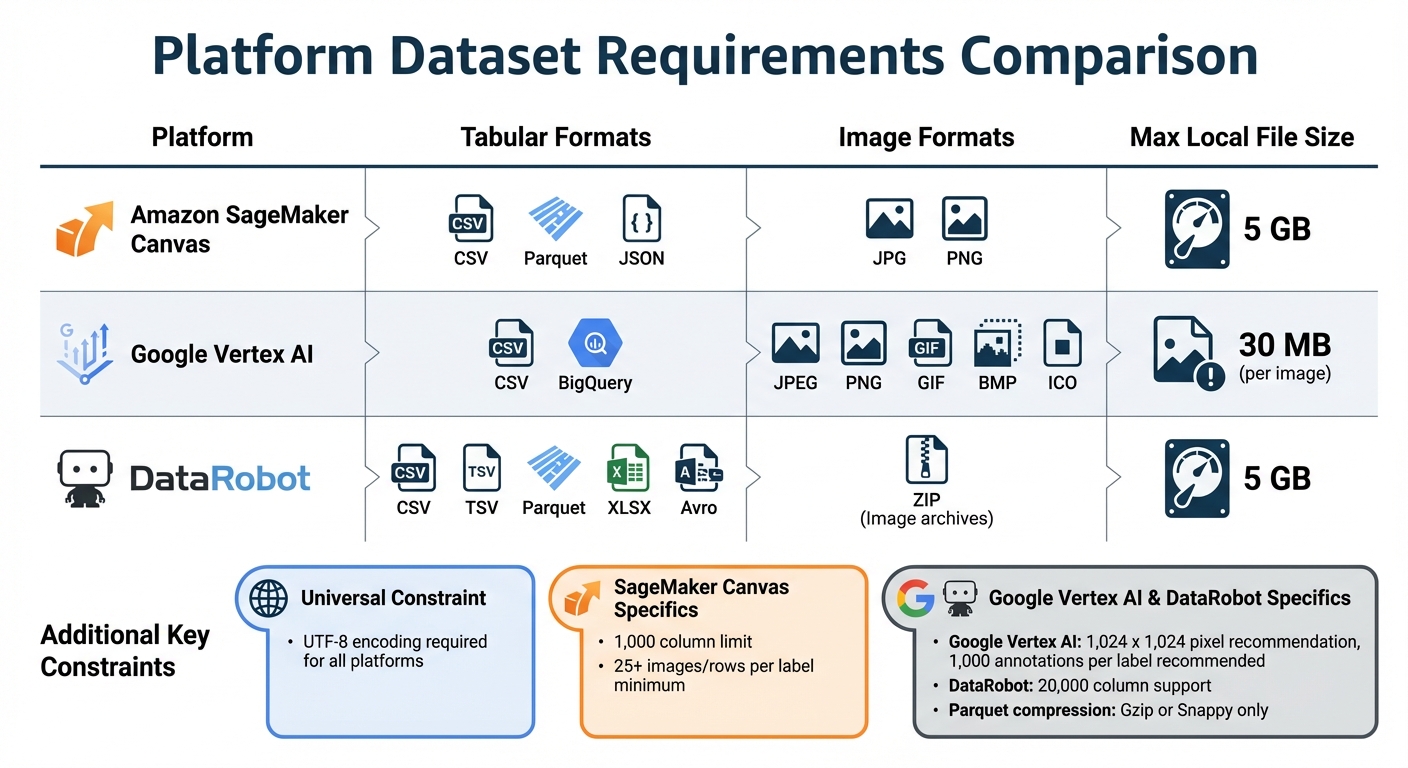
AI Platform Dataset Requirements: Format Support and Size Limits Comparison
Before uploading your data, it's crucial to review the specific requirements for each platform. Official documentation is your go-to resource for understanding file types, size limits, and other constraints. These guidelines ensure your data is compatible and ready for processing.
Identify Supported File Formats
Each platform supports particular file formats depending on the type of data you're working with:
- Tabular data: Common formats include CSV, Parquet, and TSV.
- Images: Supported formats often include JPG, PNG, GIF, and BMP.
- Text data: Typically works best with JSONL or TXT files.
Most platforms require files to be encoded in UTF-8 for smooth processing and compatibility. To avoid issues like automatic conversions or rejections, ensure column names are free of spaces or special characters. For numeric data, use a period (.) as the decimal separator to maintain accuracy. Some platforms, like Amazon SageMaker Canvas and DataRobot, might automatically replace spaces and special characters with underscores or reject the file entirely.
Here’s a quick comparison of supported formats and limits for popular platforms:
| Platform | Tabular Formats | Image Formats | Max Local File Size |
|---|---|---|---|
| Amazon SageMaker Canvas | CSV, Parquet, JSON | JPG, PNG | 5 GB |
| Google Vertex AI | CSV, BigQuery | JPEG, PNG, GIF, BMP, ICO | 30 MB (per image) |
| DataRobot | CSV, TSV, Parquet, XLSX, Avro | ZIP (Image archives) | 5 GB |
Check Data Size and Performance Limits
In addition to file formats, you'll need to consider file size and performance constraints, as they vary by platform. For example:
- File size limits: SageMaker Canvas and DataRobot allow local uploads up to 5 GB, while cloud sources can handle larger files. Google Vertex AI, however, limits individual training images to 30 MB and suggests keeping image resolutions below 1,024 x 1,024 pixels to avoid quality degradation during normalization.
- Column and row limits: DataRobot supports datasets with up to 20,000 columns, while SageMaker Canvas imposes a stricter limit of 1,000 columns for tabular data. For effective model training, SageMaker Canvas requires at least 25 images or rows per label. On the other hand, Google Vertex AI recommends around 1,000 annotations per label for optimal results.
If you’re working with Parquet files, make sure they use supported compression types like Gzip or Snappy. Unsupported compression formats can lead to import errors, disrupting your workflow.
Step 2: Use Standard Data Formats
Choosing the right data format is critical for ensuring your datasets work seamlessly across platforms. For datasets under 10GB, CSV or JSON are reliable options. When dealing with larger datasets - those exceeding 100GB - opt for columnar formats like Parquet or ORC, which are specifically designed for efficiency at scale. In fact, performance tests show that ORC with Zlib compression can reduce storage needs by up to 97%.
For flat data, CSV or Parquet are excellent choices, while JSON or Avro work better for nested structures. Hugging Face, for example, recommends Parquet due to its rich typing capabilities and compatibility with the Dataset Viewer. On the other hand, platforms like Amazon SageMaker often rely on JSON-based manifest files to organize raw data for labeling tasks.
To ensure compatibility across platforms, always use UTF-8 encoding for CSV files. For datasets larger than 50GB, break them into smaller shards of 1GB–5GB to avoid memory issues and speed up uploads. Hugging Face enforces a maximum file size of 200GB but suggests keeping shard sizes around 50GB for optimal performance.
By aligning with platform requirements and using standard formats, you can simplify data integration and ensure smoother workflows.
Compare Common Data Formats
Here’s a quick comparison of popular data formats to help you make an informed choice:
| Format | Schema Support | Storage Size | AI Framework Compatibility | Best Use Case |
|---|---|---|---|---|
| CSV | No (Ambiguous types) | Large | High (Universal support) | Simple tabular data, legacy systems |
| JSON | No (Usually inferred) | Large (Verbose) | High (Universal support) | Small datasets, configuration files, manifests |
| Parquet | Yes (Embedded) | Small (Highly compressed) | High (Hugging Face, Spark, Snowflake) | Large-scale ML training, analytical workloads |
| Avro | Yes (JSON-defined) | Small (Binary) | Moderate (Streaming/Big Data) | Real-time data streaming and serialization |
| HDF5 | Yes (Metadata) | Moderate/Small | Moderate (Common in Keras/TensorFlow) | Complex scientific data, multi-dimensional arrays |
If you’re working with scientific data stored in formats like HDF5 or NetCDF, consider converting them to Parquet with "Array" features. This approach preserves the structure of the data while making it compatible with modern AI frameworks and cloud-based tools.
Step 3: Validate Data Schemas
A data schema lays out the blueprint for your dataset, defining elements like column names, data types, and field constraints. Skipping schema validation can result in ingestion errors or corrupted records, which could derail your data workflows.
For binary formats like Apache Avro, where field names and type information are not embedded, the schema acts as the sole guide for interpreting data. To avoid breaking existing applications, always ensure updated schemas remain compatible with the original versions.
Platforms such as BigQuery and Vertex AI simplify the process by automatically detecting schemas in self-describing formats like Avro, Parquet, and ORC. However, for formats like CSV and JSON, you’ll need to define schemas manually to enforce data types and constraints. After auto-detection, it’s important to map key properties to their corresponding critical fields.
Using schema registry compatibility modes (e.g., Backward or Full) ensures that both current and older data remain accessible to consumers. If you rename fields, include the previous name as an alias and provide default values for any newly added fields to maintain seamless compatibility.
Schema Validation Tools
Automating schema validation is essential for maintaining data integrity, and there are several tools designed for this purpose.
JSON Schema is a widely used standard for describing and validating JSON documents. It allows you to specify document structures, data types, and constraints. Validation keywords like required (for mandatory fields), exclusiveMinimum (for numeric limits), and uniqueItems (for array validation) help enforce data quality.
Apache Avro uses JSON to define schemas while storing data in a compact binary format. It requires the schema to read data correctly and supports schema evolution through features like aliases and fingerprints. Other tools, like AWS Glue Schema Registry, offer centralized schema management and enforce compatibility modes. Meanwhile, Vertex AI provides an auto-detect feature for initial schema proposals, which can then be edited as needed.
Keep in mind that Vertex AI limits the number of fields that can be marked as "retrievable", "indexable", or "searchable" to 50 within a single schema. In BigQuery, column names can be up to 300 characters long, and descriptions are capped at 1,024 characters.
Step 4: Manage Annotation Compatibility
Annotations differ across platforms, and mismatched formats can lead to lost labels or training errors. To avoid these issues, focus on compatibility from the start.
Use Standard Annotation Formats
Using a standard annotation format helps prevent conversion errors. For object detection and instance segmentation, COCO JSON is often the go-to choice. According to CVAT, "The COCO dataset format is a popular format... making it a safe default choice for typical object detection projects". Most modern AI tools, like CVAT and FiftyOne, support COCO natively, ensuring smooth transitions between platforms.
Here’s how some common formats handle annotations:
- COCO JSON: Stores all annotations and metadata in a single JSON file, typically using [x, y, width, height] for bounding boxes.
- Pascal VOC XML: Creates separate XML files for each image, using [xmin, ymin, xmax, ymax] coordinates.
- YOLO TXT: Uses normalized [center_x, center_y, width, height] values in individual text files.
When switching between formats, rely on tools like FiftyOne or Roboflow instead of creating custom scripts. As Joseph Nelson, CEO of Roboflow, puts it: "A data scientist spending time converting between annotation formats is like an author spending time converting Word documents to PDFs". Roboflow alone supports over 50 annotation formats.
To maintain accuracy, standardize class names and ensure bounding boxes stay within image boundaries. These practices create a solid foundation for reliable annotations, making it easier to collaborate and troubleshoot.
Work with Data Annotation Companies
Once you’ve standardized your formats, consider partnering with professional annotation companies to boost reliability. These companies follow strict workflows and quality controls, ensuring annotations are compatible across platforms. Large-scale projects - those requiring 99%+ accuracy - often involve over 1,000 labelers working together. Many providers use human-in-the-loop (HITL) systems, combining automated tools with human oversight for top-quality results.
To get the most out of these partnerships:
- Create a gold dataset: This benchmark dataset, annotated by experts, helps calibrate the workforce’s performance.
- Define clear label taxonomies: Use the MECE principle (Mutually Exclusive and Collectively Exhaustive) to ensure every data point fits into one category.
- Request consensus pipelines: For subjective tasks, ask for multiple annotators to label the same data, with the final label decided by majority vote.
Ensure that your annotation partner provides data in machine-readable formats like JSON, CSV, or XML, which are easy to integrate with conversion tools. For sensitive data, verify certifications such as SOC2 or HIPAA to ensure compliance with secure enterprise platforms.
If you’re searching for qualified providers, Data Annotation Companies offers a detailed directory to help you find experts that meet your platform and quality needs.
sbb-itb-cdb339c
Step 5: Convert Dataset Formats
Once your annotations are standardized, you’ll often need to adjust your dataset into various formats to suit different platforms. Using the right tools and methods can help you streamline this process and avoid errors.
Use Conversion Tools
The Hugging Face datasets library is a versatile option for modifying dataset structures. Functions like cast(), flatten(), and map() are particularly useful. For initial data manipulation, libraries such as Pandas and Polars offer direct conversion methods like Dataset.from_pandas() and Dataset.from_polars().
When preparing datasets for specific frameworks, use their respective conversion tools. For PyTorch, apply Dataset.set_format(type='torch'). For TensorFlow, the to_tf_dataset() function is ideal. To speed up processing, use num_proc and set batched=True in the map() function.
It’s also crucial to apply best practices during these transformations to ensure consistency across platforms.
Best Practices for Data Transformation
- Export as Parquet: This format helps maintain data types during conversion.
- Sanitize Data: Remove non-JSON-compliant values such as
NaN,-Inf, andInf. - Handle DateTime Objects: Convert them to strings, as many AI platforms don’t support DateTime formats natively.
- Manage Large Datasets: Use
Dataset.from_generator()to progressively generate datasets on disk and leverage memory-mapping for datasets that exceed memory limits. - Cast Types Wisely: For example, convert 0s and 1s from
int32toboolonly when appropriate. - Test on Subsets: Before applying transformations to the entire dataset, test them on smaller subsets to identify potential issues.
Preparing data can take up a significant portion of your machine learning project - up to 80% of the total timeline. That’s why investing time into proper conversion practices is essential. For large datasets, use parameters like max_shard_size (e.g., "500MB" or "1GB") to prevent memory errors and ensure the dataset remains manageable across platforms.
Step 6: Test on Target Platforms
Testing your converted datasets on target platforms early is essential for identifying compatibility issues before they escalate. Once you complete initial tests, address errors using precise fixes to ensure smooth operation.
Run Practical Workflow Tests
Before uploading datasets to the cloud, test them locally using dataset loaders and preview tools. This step ensures data accessibility and helps catch errors early. For large datasets, start with a smaller subset to identify problems like schema or encoding issues without overloading resources.
After uploading, leverage built-in preview tools on platforms like SageMaker Canvas or OpenAI's Data tab. These tools let you inspect the initial rows of your dataset, making it easier to spot errors such as spaces in Parquet column names or incorrect CSV delimiters. Catching these issues early saves time and resources before running full-scale training jobs.
To mimic real-world usage, run inference and evaluation tests. For example, Google Vertex AI provides a systematic run_inference() → evaluate() workflow to ensure your dataset triggers accurate model responses and aligns with ground truth. If you're using managed training pipelines, confirm that your application correctly interprets platform-injected variables like AIP_DATA_FORMAT and AIP_TRAINING_DATA_URI.
Fix Common Errors
When issues arise during workflow tests, apply focused solutions to resolve them effectively:
- Platform Constraints: Check for specific limits like folder capacity or file size. For example, Hugging Face caps folders at 10,000 files and supports files up to 200GB via LFS, while SageMaker Canvas restricts local uploads to 5GB and images to 30MB. Ensure your dataset complies with these limits to avoid errors.
- File Path Errors: If you encounter "File Not Found" errors due to leading slashes in metadata paths, switch to relative paths to resolve the issue.
-
Memory Issues: Large datasets can cause memory errors. Adjust shard sizes during uploads, such as setting
max_shard_size="500MB", to prevent these problems. - CSV Parsing Problems: When importing CSVs into platforms like SageMaker Canvas, enable the "Multi-line detection" option to handle cells with newline characters and avoid parsing failures.
Automated tools can also help identify and resolve issues at scale. For instance, OpenAI Evals supports string matching for factual responses, evaluates semantic similarity using embeddings, and even performs LLM-based scoring for subjective criteria like tone or helpfulness.
| Error Type | Common Cause | Quick Fix |
|---|---|---|
| File Not Found | Leading '/' in metadata paths | Use relative paths without leading "/" |
| Memory Errors | Dataset exceeds platform limits | Reduce shard size (e.g., "500MB") |
| Schema Mismatches | Spaces in Parquet column names | Remove spaces from all column names |
| Parsing Failures | Multi-line CSV cells | Enable the "Multi-line detection" option |
Step 7: Build Automated Pipelines
Automation helps reduce manual labor and addresses compatibility issues before they arise. By building on earlier data conversion techniques, automation ensures your workflow runs smoothly and efficiently.
Use Automation Tools
Tools like Apache Airflow are excellent for managing dataset processing. By using Python-based Directed Acyclic Graphs (DAGs), Airflow can handle tasks such as format conversion, quality checks, and uploads seamlessly. For validating data quality, Soda Core integrates directly with Airflow through YAML-based rules. For example, rules like missing_count = 0 or duplicate_count = 0 can be defined and triggered via a BashOperator. As Astronomer explains:
Integrating Soda Core into your Airflow data pipelines lets you use the results of data quality checks to influence downstream tasks.
When it comes to format conversion, the Hugging Face datasets library is a powerful option. Built-in methods such as from_pandas or from_generator can automatically convert raw data into Parquet files. This ensures schemas are explicitly stored and avoids the column type ambiguities often found in CSV files. For datasets that are too large to fit into memory, generators allow for progressive on-disk processing, preventing system crashes. You can also automate the removal of non-JSON-compliant values to maintain data integrity.
For deploying pipelines at scale, Databricks Asset Bundles paired with Terraform can help create consistent and reliable workflows.
Add Dataset Checks to CI/CD
Automated checks in your CI/CD pipeline strengthen your data lifecycle by ensuring quality and consistency. Storing data quality rules in version control allows for better management and traceability. Google Cloud highlights the importance of this approach:
Managing your data quality rules as code provides you with versions of your data quality rules that are available in your GitHub history.
You can configure tools like GitHub Actions, Azure DevOps, or Cloud Build to automatically trigger validation checks whenever developers push code or open pull requests. Using terraform plan helps preview infrastructure changes before applying them, ensuring that updates won’t disrupt existing workflows. Additionally, branch protection rules can enforce successful validation tests before merging, preventing incompatible datasets from reaching production.
Validation should occur at multiple stages of your pipeline. For example, check schemas during data ingestion, verify field-level quality in staging, validate referential integrity during transformations, and reconcile record counts before final loading. Use environment variables for paths and database connections instead of hard-coding them, enabling the same pipeline to run across various environments. To avoid duplicate records during re-runs, implement UPSERT operations to ensure idempotency.
| Tool Category | Recommended Options | Primary Integration |
|---|---|---|
| Orchestration | Apache Airflow, Lakeflow Jobs | Spark, Snowflake, Docker, Kubernetes |
| Data Validation | Soda Core, Great Expectations | Airflow, Spark, PostgreSQL, BigQuery |
| CI/CD Platforms | GitHub Actions, Azure DevOps, Jenkins | Databricks CLI, Terraform |
| Format Conversion | Hugging Face datasets, Pandas |
Python-based pipelines |
Common Problems and Fixes
Even with thorough preparation, dataset compatibility issues can still crop up. Gartner reports that poor data quality costs organizations an average of $15 million annually, with about 3% of global data degrading every month as it moves through systems. Tackling these problems early can save both time and resources. Below, we’ll dive into common challenges and practical solutions.
Prevent Data Loss During Conversion
One frequent culprit behind data loss is column type ambiguity. For example, CSV files don’t explicitly define data types, so an integer like "123" might be misread as a string. This creates downstream problems, especially for machine learning models expecting numeric inputs. A better alternative? Use Parquet files. Unlike CSVs, Parquet files store column types explicitly, eliminating this guesswork entirely.
Before finalizing your data, check for non-JSON compliant float values like NaN, -Inf, and Inf. These values can cause issues during conversion, so replace or remove them beforehand. Likewise, convert DateTime fields into String format to avoid platform rejection.
Encoding errors are another common pitfall. To avoid corrupting your records, always save CSV files in "CSV UTF-8 (Comma-delimited)" encoding. For text fields containing commas, use proper escape characters, like double quotes, to maintain data integrity. If you’re working with annotation formats such as Darknet TXT, make sure to include all auxiliary files (e.g., labels.txt), as missing files can lead to errors.
For datasets larger than 100GB, use sharding to avoid memory-related crashes. Setting a max_shard_size, such as 5GB, can help manage the upload process efficiently. Always run a small-scale workflow test - using commands like load_dataset in Python - before committing to a full platform migration. This helps identify potential issues early on.
Beyond conversion challenges, annotation inconsistencies can also impact the performance of your models.
Fix Inconsistent Annotations
Inconsistent annotations can derail AI projects, but a golden dataset can help. This dataset, made up of verified ground truth annotations, serves as your benchmark for accuracy. Use it to evaluate annotator performance and pinpoint deviations from your standard. For tasks with subjective elements, like sentiment analysis, implement consensus algorithms. Have multiple annotators label the same items, then accept the majority choice or use weighted voting to prioritize high-confidence annotators.
Automated performance monitoring is a great way to catch errors early. For example, review the first 10 documents labeled by any new annotator to spot systematic issues before they escalate. For larger projects, leveraging LLM-generated draft labels can cut human annotation effort by 50% to 80%, though manual review remains critical to ensure accuracy.
When inconsistencies are identified, standardize field formats to minimize misinterpretation. For instance, use consistent naming conventions - replace spaces with underscores and avoid abbreviations. This improves the accuracy of automated extraction tools. If you’ve made manual changes to cloud storage folders, use "Resync" features to ensure the platform’s metadata matches the actual storage content.
Conclusion
Ensuring datasets work seamlessly across various AI platforms is entirely possible with a thoughtful approach. Start by reviewing platform-specific requirements, standardizing data formats, validating schemas, and automating repetitive tasks. These steps not only prevent costly errors but also keep your projects on track.
Each platform comes with its own constraints. For instance, Hugging Face imposes a 200GB file size limit and recommends keeping folder counts below 10,000. For large datasets, formats like Parquet are ideal, while JSONL or CSV work well for smaller projects. Schema validation during data ingestion is crucial - it minimizes errors and ensures proper field mapping. Additionally, adopting standard naming conventions, such as using first_name instead of First Name, can improve compatibility with generative AI tools.
Automation plays a huge role in improving efficiency. Automated pipelines can take care of up to 80% of data preparation tasks. As Ankur Patel, Founder, points out, working with clean, well-prepared data is far easier than dealing with messy, incomplete datasets. Incorporating automated checks into your workflow not only ensures consistency but also frees up time for more critical tasks like model development.
For tasks like data annotation, especially for complex projects, consider working with experienced providers. Platforms like Data Annotation Companies offer directories to help you find specialized AI service providers tailored to your project needs. By combining proper preparation, automation, and the right tools, you can achieve smooth dataset compatibility across all AI platforms.
FAQs
How can I make sure my dataset works smoothly across different AI platforms?
To make sure your dataset works smoothly across different AI platforms, start by building a universal schema with clear field names and defined data types. Use widely supported formats like UTF-8 CSV, JSON, or Parquet for storing your data. Before uploading, take the time to validate your dataset against the schema to spot and fix any inconsistencies or errors. This step is crucial for avoiding compatibility problems and ensures easy integration with platforms like Azure or Hugging Face.
What are the best practices for converting datasets without losing data quality?
To keep your dataset accurate and reliable during format conversion, start by validating the raw data. Identify and address problematic entries such as NaN values or infinite numbers. It's also essential to verify that each column has the appropriate data type - whether it's a string, integer, or float. This step minimizes the risk of errors during the transformation process.
Then, choose a widely supported format like CSV, JSON, or Parquet, and stick to the specific guidelines for that format. For instance, when working with CSV files, use UTF-8 encoding, commas as delimiters, and double quotes to escape embedded quotes. Always include a clear header row and maintain a consistent column order to simplify usage across different platforms.
Finally, maintain the dataset’s structure and metadata. Store any necessary schema files or documentation that explains the data hierarchy, and organize the converted files in a well-structured repository. This approach ensures compatibility with AI tools and workflows. If you require professional assistance with formatting or annotations, you can consult the Data Annotation Companies directory, which lists experts ready to prepare your datasets for AI projects.
Why should you automate data pipelines for seamless AI platform compatibility?
Automating data pipelines guarantees your datasets are consistently formatted and ready to function across various AI platforms. By standardizing file types like CSV or JSON and ensuring accurate metadata, automation eliminates manual errors such as mismatched formats or incorrect labeling. This means you can load the same dataset onto any system without needing extra tweaks.
It’s also a huge time-saver. Modern AI projects demand speed and precision, and manual processes often slow things down while increasing the risk of mistakes. Automation helps avoid common issues like inconsistent data structures or incomplete labeling, keeping your workflow efficient and error-free from start to finish.
On top of that, automated pipelines enhance both cost efficiency and reliability. They simplify the transfer of data between storage systems and analytics tools, ensuring stability while cutting down on transfer expenses. For teams that rely on high-quality labeled data, collaborating with data annotation experts can seamlessly integrate annotations into automated workflows, making the process smooth and adaptable to any platform.