How to Monitor Annotation Projects Effectively
· Data Annotation
Set clear goals, track accuracy and IAA, use real-time dashboards, and combine automated and human QA to reduce errors and speed annotation projects.
How to Monitor Annotation Projects Effectively
Effective monitoring is the key to ensuring annotation projects deliver high-quality training data for AI models. Poor oversight can lead to wasted budgets, rework, and compromised model performance. Here's what you need to know:
- Why Monitoring Matters: Poor data quality costs companies $12.9M annually, and 80% of machine learning projects fail to deploy due to issues like flawed annotations.
- Set Clear Goals: Define objectives for timelines, quality (e.g., 95% accuracy), productivity, and consistency (e.g., inter-annotator agreement above 0.8).
- Track Metrics: Use annotation accuracy, inter-annotator agreement, and task efficiency metrics to measure progress.
- Choose the Right Tools: Platforms with real-time dashboards, outlier detection, and integration options (e.g., APIs) simplify monitoring and improve oversight.
- Implement QA Processes: Combine automated checks, human reviews, and consensus workflows to catch errors early.
- Analyze and Iterate: Use performance data to refine workflows, guidelines, and roles, ensuring continuous improvement.
Monitoring tools and structured QA pipelines can reduce annotation errors by 25% and cut project timelines by up to 50%. Start with clear metrics and the right tools to save time, money, and effort.
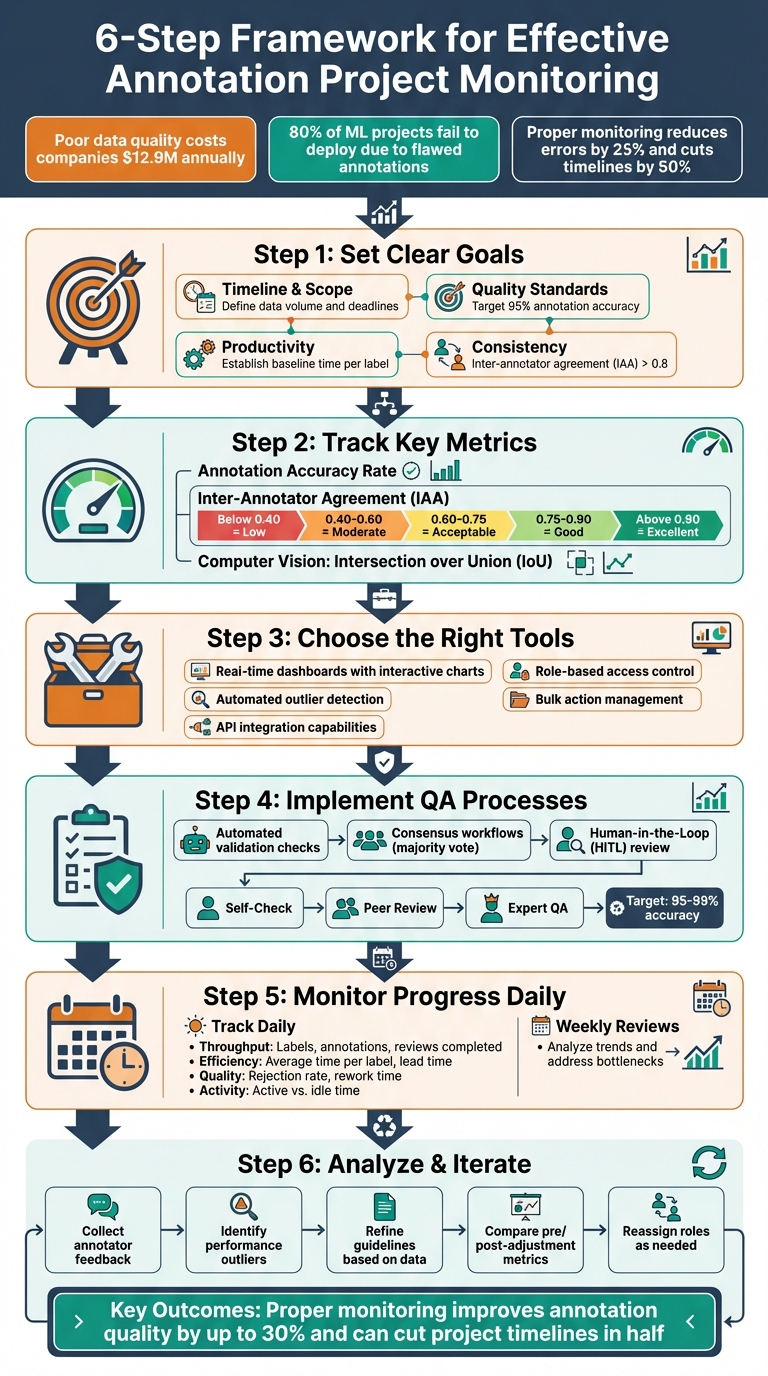
6-Step Framework for Effective Annotation Project Monitoring
How to set up project workflow for image annotation and AI projects
sbb-itb-cdb339c
Set Goals and Key Metrics
To monitor effectively, you need to start with a clear plan. Defining specific goals and measurable metrics ensures your process is structured and not left to guesswork. These benchmarks will support the tools and quality checks covered later.
Define Project Objectives
Begin by outlining specific, measurable targets across four main areas:
- Timeline and Scope: Decide on the data volume, set deadlines, and determine throughput expectations.
- Quality Standards: Differentiate between critical errors and minor mistakes, then set an acceptable accuracy target. For example, aim for a 95% annotation accuracy rate.
- Productivity: Establish a baseline for the average time needed per label or asset. This helps identify bottlenecks early and manage the balance between speed and accuracy.
- Consistency: Use inter-annotator agreement (IAA) as a benchmark. A Krippendorff's Alpha score above 0.8 typically reflects strong agreement among annotators.
Before scaling, test with a small data batch. This step helps fine-tune throughput expectations, identify common errors, and create a "fatal error" list - mistakes that require immediate rejection.
Identify Metrics for Monitoring
Once your objectives are set, choose metrics to monitor progress:
- Annotation Accuracy Rate: This measures the percentage of correctly labeled data against the ground truth and acts as the primary quality indicator.
- Inter-Annotator Agreement (IAA): Evaluates consistency among annotators, which is especially critical for tasks involving subjective decisions.
- Computer Vision Metrics: For projects involving bounding boxes or masks, use Intersection over Union (IoU) to assess spatial precision alongside throughput metrics.
For agreement metrics, different tools work for different setups:
- Cohen's Kappa: Best for pairwise workflows.
- Fleiss' Kappa: Ideal for three or more fixed annotators.
- Krippendorff's Alpha: Useful when annotators vary or data is missing.
IAA values are often interpreted as follows: below 0.40 indicates low agreement, 0.40–0.60 suggests moderate agreement, 0.60–0.75 is acceptable, 0.75–0.90 is good, and above 0.90 is excellent.
"Setting clear and achievable goals for data annotation projects is like charting a course for success. It provides a roadmap for the annotators, helping them stay on track and measure their progress along the way." - Labelvisor
These goals and metrics are the backbone of your Service Level Agreements (SLAs). By integrating them into real-time dashboards, you can quickly spot performance dips and take corrective actions, such as updating guidelines or retraining annotators.
Choose the Right Tools and Platforms
The success of your monitoring strategy hinges on the tools you choose. A good platform should go beyond outdated, static reports and offer real-time visibility into your annotation workflow. Look for centralized dashboards that present interactive charts, heatmaps, and trend lines to track throughput, annotation activity, and quality scores as they happen.
Features to Look for in Monitoring Tools
Choosing the right tools starts with aligning their features to your project goals and metrics. The goal? Real-time, actionable insights.
Focus on platforms that track detailed performance metrics. Metrics like Average Handle Time (AHT) per labeled data row, rework time, and average time per label can uncover inefficiencies that high-level summaries often miss. For instance, tools such as Labelbox Monitor and CVAT Analytics can detect outliers using sigma filtering and calculate average annotation speeds.
Automated outlier detection is another must-have. Effective tools can flag issues like inconsistent annotations, unusually fast marking, or quality scores that deviate from team norms. This allows for immediate intervention rather than waiting until the final review. Quality control features should also include inter-annotator agreement scores, consensus tracking, and bulk role changes - like reassigning a labeler to a reviewer role - all accessible from performance dashboards.
Integration capabilities are equally important for scalability. Look for platforms with API access to generate custom reports or sync data with external tools like Tableau or Power BI. Built-in collaboration features, such as email notifications for task updates, role-based access control, and direct feedback on errors, can streamline workflows without relying on additional communication tools.
| Feature Category | Essential Capabilities |
|---|---|
| Throughput Tracking | Total labels submitted, annotations created, and review actions performed |
| Efficiency Metrics | Average time per label, rework time, and stage transition speed |
| Quality Indicators | Consensus scores, error rates, and inter-annotator agreement |
| Management Tools | Bulk select actions, role-based permissions, and automated notifications |
| Advanced Analytics | Outlier detection (sigma filtering), class distribution, and label usage patterns |
Use Annotation Platforms
Platforms with integrated monitoring tools make oversight simpler by consolidating all your data into one view. Instead of juggling spreadsheets, you get a unified snapshot of your workspace. For example, CVAT provides tiered analytics access: Owners and Maintainers see all workspace data, while Workers only view metrics tied to their tasks. This balances transparency with preventing information overload.
For more complex projects, consider using APIs to feed platform data into tools like Looker Studio or Google Sheets. In medical data annotation, analytics tools such as Tableau have cut errors by 25%. Similarly, image annotation for autonomous vehicles using Labelbox metrics has boosted accuracy by 15% while significantly reducing rework time.
When evaluating platforms, prioritize drill-down capabilities. These let you shift seamlessly from a high-level view of the workspace to specific annotation records, making it easier to investigate errors. Automating reports - via weekly email summaries or CSV exports - can also lighten the administrative load for project managers. Keep in mind that nearly 80% of machine learning projects fail to reach deployment, often due to poor monitoring and quality control during annotation.
With the right tools in place, the next step is to establish solid quality assurance processes to ensure ongoing oversight.
Implement Quality Assurance Processes
Structured quality assurance (QA) is a must-have for any monitoring platform. Without it, even the best tools can fall short. Interestingly, around 80% of time on AI projects goes toward data preparation and QA tasks. The goal? Catch errors early and ensure everyone on the team follows the same standards.
Create QA Pipelines
An effective QA pipeline blends automated checks with human oversight to identify a wide range of errors. Start by using automated validation tools to spot problems like invalid geometries, overlapping labels, missing annotations, or class imbalances. You can also set up event triggers - if an item fails an automated check, it can automatically be marked as "Returned", signaling it needs immediate rework.
To maintain consistency among annotators, consider using consensus workflows. This involves assigning the same data to multiple annotators and comparing their results. For subjective tasks, a majority vote works well, while for objective tasks with a single correct answer, you can validate against a gold standard dataset created by experts. Agreement rates can be calculated using tools like Cohen's Kappa for two annotators or Fleiss' Kappa for larger teams.
Random sampling and hidden ground-truth tasks are also valuable tools. These methods help uncover systemic errors without the need to review every single data point manually. Once errors are flagged, provide annotators with clear, rubric-based feedback to address the issues.
Onboarding gates are another critical step. Before granting access to production batches, require annotators to pass a quiz or complete ground-truth tasks with a minimum score. A 2016 study by Liu et al. showed that using gated instruction with interactive tutorials improved annotation precision from 0.50 to 0.77 and recall from 0.70 to 0.78.
| QA Method | Primary Goal | Best Use Case |
|---|---|---|
| Consensus | Measures Consistency | Subjective tasks where a majority vote is needed |
| Benchmark | Measures Accuracy | Objective tasks with one "correct" answer |
| Automated QA | Efficiency/Syntax | Catching technical errors like overlaps or empty attributes |
Add Human Review
Automation can't catch everything, especially for complex or subjective tasks. That's where multi-tier review systems shine. For example, a three-tier process - Annotator Self-Check, Peer Review, and Expert QA - can achieve accuracy levels as high as 95–99%.
Human-in-the-Loop (HITL) processes are particularly useful in specialized fields. In 2020, one hospital used HITL for annotating tumor scans. AI handled straightforward cases, while skilled annotators focused on edge cases, leading to a 40% faster turnaround time and better diagnostic reliability. Similarly, a global e-commerce platform refined its product categorization rules in the same year, improving annotation accuracy by 22% in just one quarter. For example, they clarified whether "smart fridges" should be categorized as electronics or appliances.
When providing feedback, avoid generic rejections. Instead, offer specific, actionable guidance. For instance, you might tell annotators to ensure each car is enclosed in its own bounding box. Tools that let reviewers highlight specific problem areas - like missing or misclassified elements - can also make feedback clearer. Additionally, create escalation paths so annotators can flag ambiguous cases rather than guessing, which helps ensure data consistency.
Finally, implement guardrails like speed-based signals or duplicate-answer detection to quickly identify low-effort submissions. These measures not only improve quality but also set the foundation for better tracking and monitoring of your annotation projects.
Monitor Progress and Performance
Once your QA processes are up and running, the next step is keeping a close eye on how your project moves forward each day. Without consistent oversight, workflows can veer off course, leading to missed deadlines or quality issues. The solution? Combine real-time data tracking with regular team check-ins to identify and resolve issues early.
Track Daily Progress and Reports
Annotation platforms offer real-time insights into team performance, making it easier to stay on top of your quality and productivity goals. Focus on throughput metrics - the daily count of labels, annotations, and reviews - to ensure you're meeting deadlines. Tools like CVAT and Label Studio are especially useful, providing data on annotation speed and lead times.
Utilize visual workflow tracking, such as Sankey charts, to monitor how assets move through various stages: None, Annotated, Review, To Fix, and Completed. If you notice a high volume of assets in "To Fix" or "Rework", it could signal unclear guidelines or the need for retraining. For example, in December 2024, a data annotation company used Labelbox to track accuracy and throughput for an autonomous vehicle dataset. By analyzing these metrics, the team boosted annotation accuracy by 15% and significantly cut down on rework time.
It's also important to differentiate between "Active" (focused work) and "Idle" time. Platforms like Dataloop automate this process by pausing time tracking after 5 minutes of inactivity. This level of detail helps pinpoint bottlenecks and measure true engagement. Automating alerts for anomalies - like unusually high speeds paired with low object counts - can provide additional insights. These real-time metrics are essential for preparing for more in-depth reviews, ensuring your team stays aligned with project goals.
| Metric Category | Key Daily Metrics to Track | Description |
|---|---|---|
| Throughput | Done, Labels, Annotations, Reviews | Tracks the volume of work moving through the workflow |
| Efficiency | Avg Time per Label/Task, Lead Time | Measures the speed and time-cost of the labeling process |
| Quality | Rejection Rate, Rework Time | Identifies time spent fixing errors versus completing new work |
| Activity | Total Working Time, Active vs. Idle | Monitors actual time spent by annotators in the labeling interface |
Schedule Regular Status Updates
While daily metrics are important, they need to be analyzed in context. Set up weekly reviews - Friday is often a good day - to go over reports and identify trends like drops in label volume or spikes in rejected tasks. These meetings are a chance to address performance issues, clarify confusing edge cases, and tweak workflows before minor problems turn into major setbacks.
"If you notice a high discrepancy between tasks that have been reviewed versus tasks that have been annotated, you might want to assign more reviewers to the project to complete it by your deadline." - Label Studio
Use these check-ins to dive deeper into individual performance. Filtering by annotator can help identify team members struggling with specific data types or labels. For instance, in 2024, a healthcare research project used Tableau to track medical data annotation progress. By implementing real-time tracking and monitoring compliance with quality standards, they reduced errors by 25% and completed the project faster. If there's a gap between submitted and reviewed annotations, you can decide whether to add more reviewers or schedule a retraining session to address recurring issues.
Finding the right balance between speed and quality is critical. High throughput means little if it compromises accuracy. Monitor the relationship between annotation time and review time - if review time starts to outpace annotation time, your QA process might be the bottleneck. Regular status updates help you catch these patterns early, allowing you to adjust strategies before they impact your timeline.
Establish Feedback and Iteration Loops
Feedback loops are essential for improving annotation quality over time. While tracking metrics is important, acting on feedback is what truly drives progress. The most effective annotation projects treat feedback as a collaborative process. Annotators highlight confusing areas, and managers adjust workflows to address these challenges. Without this dynamic, the same mistakes can resurface repeatedly.
Collect Annotator Feedback
Annotators are often the first to encounter edge cases or unclear instructions. To make the most of their insights, establish easy-to-use communication channels. Whether through in-tool commenting, Slack, or shared documents, annotators should have a way to flag confusing examples or suggest updates without disrupting their work. Real-time queries can help address issues before they escalate.
"Without a clear feedback mechanism, annotators may never realize that their work is not what is needed for the project." - Keymakr
Feedback from annotators becomes the foundation for improving workflows through iteration. Make rejection comments specific and actionable. Instead of labeling an item as simply "wrong", tie feedback to specific guidelines, such as: "Ensure each car has its own bounding box." This approach turns reviews into learning opportunities rather than punitive measures. Research shows that integrating feedback during training and competency testing significantly boosts both precision (from 0.50 to 0.77) and recall (from 0.70 to 0.78) compared to traditional methods.
Improve Workflows Through Iteration
Once annotator feedback is collected, the next step is refining guidelines and workflows. Tools like inter-annotator agreement metrics, such as Cohen's kappa, can help identify areas where consensus is low. Use this data to create clearer guidelines, especially for edge cases, and include illustrative examples. Patterns in rejection comments can also reveal gaps in your instructions.
Regular calibration sessions - held weekly or monthly - are crucial for reviewing cases with high disagreement. These sessions help the team align on how to handle subjective or tricky scenarios. To complete the feedback loop, show annotators how their input has shaped the final guidelines or improved model outcomes. This acknowledgment reinforces the value of their contributions.
Analyze Data and Adjust Strategies
Once you've gathered feedback and established iteration loops, the next step is to transform monitoring data into actionable improvements. This analysis helps pinpoint where your annotation workflow is falling short and identifies areas where changes can have the most impact. Skipping this step means relying on guesswork instead of addressing the actual problems.
Detect Issues and Imbalances
Start by identifying performance outliers. Use range filtering to flag annotators whose labeling or review times deviate significantly from the average. Annotators working much slower or faster than others may signal unclear guidelines or gaps in quality control.
Another key factor to watch is class imbalance. Class distribution tables can reveal if certain categories are over-represented or under-represented in your dataset. A dataset dominated by one class can lead to a model that performs well on common examples but struggles with rare ones. Similarly, spatial heatmaps can highlight if annotators are focusing only on the center of images, which can result in models that fail to handle edge-case placements.
To uncover workflow bottlenecks, Sankey charts are invaluable. For example, if assets are building up in the "To Fix" stage, it’s a sign that your guidelines might need refinement. High rework time - the average time spent correcting rejected labels - often points to poorly defined instructions or insufficient training. A co-occurrence matrix can also help by showing which classes annotators frequently confuse, highlighting the need for clearer class definitions.
Once you've identified inefficiencies, the next step is to measure the effects of any adjustments.
Compare Pre- and Post-Adjustment Metrics
To gauge the success of your strategy changes, compare key metrics before and after implementing adjustments. For instance, track the Average Handle Time (AHT) for each completed data row, which includes labeling, reviewing, and reworking time. This metric reflects the true "cost" in time for each finished asset. Improving annotation quality can boost model accuracy by 15-25% and cut training time by up to 40%, making these efforts well worth it.
| Metric | Pre-Adjustment Issue | Strategy Change | Post-Adjustment Goal |
|---|---|---|---|
| Inter-Annotator Agreement | Low IAA scores | Refine guidelines; add gold standard examples | Higher IAA; lower rejection rate |
| Rework Time | High time spent fixing labels | Targeted training for outliers | Reduced rework time; faster throughput |
| Review-to-Labeling Ratio | Review stage taking too long | Promote top labelers to reviewers | Balanced stage transitions |
| Class Balance | Over-represented classes | Targeted data acquisition for rare classes | Balanced learning across all classes |
When underperformance is identified, consider role reassignment. Promote top-performing labelers to reviewer roles, while those who consistently struggle may benefit from additional training or a shift to simpler tasks. A Krippendorff's Alpha score above 0.8 confirms strong inter-annotator reliability, signaling that your adjustments are working effectively.
Conclusion
Keeping annotation monitoring on track requires a steady focus on clear objectives, reliable tools, and consistent fine-tuning. These elements work together to ensure your project stays aligned and productive. Start by setting precise goals and measuring the right metrics - like annotation accuracy and inter-annotator agreement scores.
Low-quality annotations can have serious consequences. For example, a 10% drop in label accuracy can significantly hurt model performance. This is why tools like real-time dashboards and automated error detection are so critical. Adding multi-layered quality checks and human-in-the-loop validation can catch issues early, preventing them from polluting your training data.
Dashboards and automated reports are game-changers for tracking metrics like throughput, rework rates, and stage transitions in real time. Integrating these with tools such as Power BI or Tableau can save your team from manual data collection, allowing them to focus on strategic adjustments instead. If you notice performance issues - like high rework rates or poor inter-annotator agreement - take immediate action. This could mean refining your guidelines, retraining annotators, or adjusting roles.
Annotation guidelines should evolve as your project progresses. Establish mandatory feedback loops between data scientists and annotators to prevent costly mistakes. One AI startup learned this lesson the hard way, losing nearly half its annotation budget after needing to re-annotate 40% of its data due to unclear initial guidelines.
As the focus shifts toward data-centric AI, the priority should be on improving the training dataset itself rather than endlessly tweaking algorithms. Break projects into smaller chunks, analyze results early, and make adjustments before errors pile up. This method reinforces the importance of setting clear goals, maintaining quality assurance, and iterating throughout the process. A solid monitoring framework can improve annotation quality by up to 30% and cut project timelines in half, turning potential setbacks into opportunities for success.
For more details and a list of top annotation service providers, check out Data Annotation Companies.
FAQs
What metrics should I track first if I’m new to annotation monitoring?
When managing annotations, it's important to prioritize metrics that reflect data quality and annotation performance. Focus on key indicators like accuracy, inter-annotator agreement, and error rates. Monitoring annotation consistency is also critical. To maintain high standards, establish quality control workflows that catch and resolve issues early in the process. These metrics collectively help ensure your annotations meet the necessary standards and contribute to better project results.
How do I set realistic quality targets like accuracy and inter-annotator agreement?
To define achievable quality targets, focus on using clear and measurable metrics. For instance, inter-annotator agreement can help gauge annotator consistency, while accuracy benchmarks ensure correctness. Establish detailed guidelines and align these benchmarks with your project objectives - like targeting agreement rates of over 85%. Consistently track these metrics throughout the workflow and tweak them as needed to adapt to the complexity of your project or variations in the data.
When should I retrain annotators versus changing the workflow or guidelines?
If performance issues are tied to skill gaps, inconsistent understanding, or insufficient onboarding, consider retraining annotators. This approach can directly tackle challenges like low precision, poor recall, or inaccurate annotations.
However, if the root of the problem lies in unclear workflows or vague guidelines, focus on refining these processes first. Providing clear instructions and well-structured workflows can eliminate ambiguity and improve consistency, often without the need for retraining.