How to Scale Annotation Workflows
· Data Annotation
Strategies to scale annotation workflows: assess bottlenecks, apply AI pre-labeling, build layered teams, pick scalable tools, and enforce multi-tier QA.
How to Scale Annotation Workflows
Scaling annotation workflows is about maintaining speed and accuracy as project demands grow. Here's a quick breakdown of the key strategies:
- Assess Current Workflows: Identify bottlenecks, inefficiencies, and areas needing improvement using metrics like error rates and inter-annotator agreement.
- Automation: Use AI-assisted pre-labeling and automated quality checks to reduce manual effort and improve consistency.
- Team Structure: Organize teams into layers (annotators, experts, reviewers) for better task management and quality control.
- Training: Regularly update guidelines, provide visual examples, and conduct calibration sessions to align teams.
- Tools and Platforms: Choose platforms with features like AI-driven automation, real-time tracking, and scalability to handle large datasets.
- Quality Assurance: Implement multi-tiered QA systems and use feedback loops to refine processes continuously.
June 24 - Verified Auto Labeling: Smarter Annotation at Scale
sbb-itb-cdb339c
Evaluating Your Current Annotation Workflow
Before you scale your annotation workflow, take a step back and assess its current state. Think of it like addressing traffic congestion before adding more lanes - without fixing the core issues, scaling will only amplify the problems. This evaluation helps pinpoint what’s working, what’s not, and which metrics will track your progress. It’s the foundation for scaling effectively.
Finding Bottlenecks and Inefficiencies
Start by analyzing how much time is spent at each stage of your workflow, from data ingestion to final quality checks. This can uncover delays caused by manual tasks, software limitations, or team capacity issues. For instance, a medical text labeling team that expanded from 5 to 50 members faced a drop in inter-annotator agreement from 0.92 to 0.78. The culprit? Unclear instructions that became a bottleneck.
High rates of manual rework are another red flag. If rework frequently takes longer than the initial labeling, it’s a sign that something in your process needs fixing. Other warning signs include tools crashing or slowing down as datasets grow (e.g., scaling from 1,000 to 100,000 images), unclear guidelines, and communication gaps that lead to repeated errors.
Before going all-in on production, test the waters with a pilot batch - 1–5% of your total dataset. This trial run helps refine guidelines, uncover edge cases, and assess whether your infrastructure can handle the increased workload. Metrics like Cohen's Kappa or Fleiss' Kappa are useful for tracking inter-annotator agreement and identifying areas where interpretations differ. Additionally, keep in mind that annotators often experience noticeable productivity dips after 3–4 hours of continuous work. To counter this, consider scheduling breaks or implementing shift rotations.
Setting Baseline Metrics
Improvement starts with measurement. Establish benchmarks for throughput, turnaround time, and F1 quality scores. Creating "Gold Standard" datasets - ground truth references - is also essential for calibrating both annotator performance and automated quality checks.
For context, individual freelancers might process 1,000–1,500 text items daily, while a team of five could handle 6,000–8,000. For bounding box tasks, expect 150–300 images per person daily compared to 1,000–1,500 for a team. These figures provide a realistic baseline to measure your progress as you scale.
During this phase, document key metrics like error rates, consensus scores, and the time it takes for new team members to ramp up. For example, Tinkogroup applied this approach in an object recognition project and cut new hire training time from 4 weeks to just 10 days. These benchmarks serve as a roadmap to maintain quality and efficiency as your operations grow.
Using Automation and AI Tools
Once you've outlined your workflow and pinpointed the areas causing delays, automation becomes an essential tool for scaling. The idea isn’t to replace human judgment but to shift the focus of annotators from creating labels to refining them. By letting AI handle the initial steps, your team can concentrate on edge cases and decisions that demand human expertise. When paired with well-organized team structures, these tools lay the groundwork for scalable annotation processes.
AI-Assisted Pre-Labeling
AI-assisted pre-labeling kickstarts the annotation process by generating suggestions that annotators can either accept, tweak, or reject. This method is far quicker than starting from scratch manually. For computer vision tasks, tools like SAM (Segment Anything Model) have streamlined the process significantly. As one user from the Stanford Institute of Human-Centered AI put it, “1 click is all you need” for image segmentation.
Advanced auto-annotation tools, whether for computer vision or text classification using large language models (LLMs), can speed up annotation by a factor of 15 while cutting costs by 80%. Incorporating transfer learning and pre-trained neural networks can also boost model performance by 12%.
Active learning takes this a step further by targeting uncertain data points, while tiered workflows ensure that low-confidence labels are escalated to senior reviewers. Complex tasks can also be simplified. For example, relation extraction can be reframed into multiple-choice questions generated by LLMs, making the process more than 10 times faster. With pre-labeling accelerating the initial steps, automated quality checks ensure the final output is accurate.
Automated Quality Checks
Automated quality checks are a perfect complement to AI pre-labeling, ensuring consistency as datasets grow. Poor data quality can drain between 15% and 25% of a company’s operating budget, while inaccurate data can account for 10% to 30% of total project costs.
Programmatic validators catch objective errors instantly - think empty bounding boxes, invalid formats, or impossible attribute combinations. For more subjective tasks, consensus checks can compare the work of multiple annotators to enhance accuracy. Introducing about 10% of expert-verified "golden data" into the workflow - without notifying annotators - provides a continuous benchmark for performance.
Behavioral guardrails offer another layer of protection by flagging unusual patterns, such as unrealistically fast annotation speeds or repeated answers. Systems can even pause an annotator’s access if their accuracy on ground-truth tasks dips below a certain threshold. For massive datasets, embedding-based clustering can group similar images, making it easier to spot errors by focusing on minority clusters within a class.
Building Team Structures for Scale
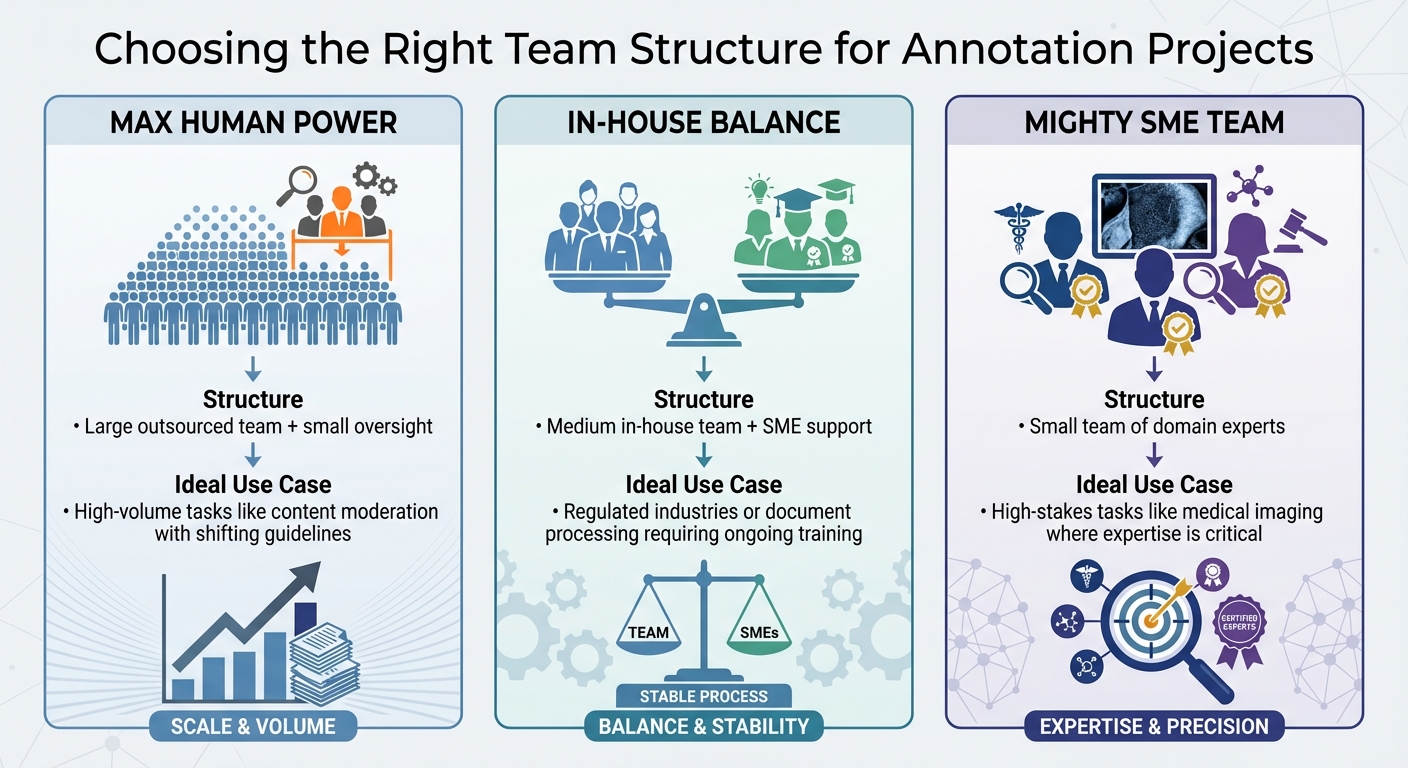
Annotation Team Structures: Comparing Max Human Power, In-House Balance, and Mighty SME Teams
Once you've implemented automation and quality checks, the next step is organizing your team effectively. A well-structured team doesn't just work faster; it ensures accuracy even as the workload grows.
Modular Team Organization
The best annotation teams are organized into layers, not just a single group. Dividing your team into general annotators, domain experts, and reviewers ensures tasks are handled by those with the right expertise. This layered approach improves both efficiency and accuracy.
For large-scale projects, the "2+1" method offers a great balance of speed and reliability. Here's how it works: each task is assigned to two annotators, and a third reviewer steps in to resolve any disagreements. This structure often reaches a 90% Inter-Annotator Agreement (IAA) score, which is a key indicator of consistency, especially for tasks with ambiguous data.
To make complex tasks easier, break them into smaller, focused labels. This reduces the cognitive load for annotators, letting them concentrate on one label at a time. As Ines Montani, Co-founder of Explosion, puts it:
The process of breaking down larger business problems into machine learning components and annotation tasks is probably one of the hardest parts of applied AI development.
This approach can speed up annotation by more than 10 times.
Start with a Calibration Phase, using small data subsets to refine your guidelines and train your team. This phase helps identify edge cases and establish a baseline for quality. Once you've met your quality standards, move into the Production Phase. During this phase, new team members should demonstrate at least 95% accuracy on a test set before working on production data.
| Team Pattern | Structure | Ideal Use Case |
|---|---|---|
| Max Human Power | Large outsourced team + small oversight | High-volume tasks like content moderation with shifting guidelines |
| In-House Balance | Medium in-house team + SME support | Regulated industries or document processing requiring ongoing training |
| Mighty SME Team | Small team of domain experts | High-stakes tasks like medical imaging where expertise is critical |
Once your modular team is established, ongoing training becomes crucial to maintaining these standards.
Training and Skill Development
Training isn't a one-time event - it’s an ongoing process. Regular skill development is essential to keep quality high as your team scales.
Hold frequent calibration sessions to review tricky or ambiguous cases. This helps keep everyone aligned as guidelines evolve and prevents inconsistencies that can occur when annotators work in isolation. If disagreement rates exceed 20%, it's a sign that guidelines need clarification or retraining.
Replace unclear instructions with visual examples of edge cases. For instance, show how to handle occlusions in image labeling, classify ambiguous text, or escalate unclear decisions. In 2025, an autonomous vehicle startup partnered with Keylabs to establish a "gold standard" testing protocol. Annotators had to achieve 95% accuracy on a benchmark pedestrian dataset before tackling production tasks. This process reduced error rates by half.
Instead of tackling one massive batch of data, use milestone-based projects. This allows you to assess quality and retrain your team between segments, avoiding the frustration of discovering widespread errors after completing 100,000 labels. As Labelbox emphasizes:
Focus on quality first, and the speed will come.
Poor data quality can drain 15% to 25% of a company's operating budget. Structured training and quality checks aren’t just helpful - they’re cost-effective. For example, in a million-image project, cutting annotation time by just 10% - from 166,667 hours to 150,000 hours - saves over 16,000 hours. If SME time costs $100+ per hour, those savings quickly add up without compromising accuracy.
Selecting Annotation Tools and Platforms
After establishing automated workflows and modular teams, the next step in scaling operations is choosing the right annotation tools. The platform you select plays a critical role in ensuring consistent, high-quality annotations at scale.
Key Platform Features
First, make sure the platform covers the basics: integration with cloud storage, AI-driven automation, and analytics. Ideally, it should work seamlessly with AWS S3, Google Cloud Storage, or Azure Blob Storage through signed URLs. Additionally, platforms with stable APIs, SDKs for automated project management, and webhooks for downstream integration can save significant time and effort.
AI-assisted labeling and pre-labeling are game-changers, cutting manual work by up to 90% and boosting model performance by 12%. By 2027, AI is projected to handle 60% of labeling tasks. Look for features like gold standard datasets, consensus labeling, and real-time Inter-Annotator Agreement (IAA) tracking to maintain accuracy and consistency.
Scalability is another must-have. Platforms should support multiple projects running concurrently and handle over 100,000 assets without performance dips. Data lineage is equally important, ensuring you can trace your data from raw input to final output. Compatibility with standard formats like COCO, YOLO, and Parquet is a non-negotiable feature for streamlined workflows. Performance dashboards that monitor annotator speed and accuracy can also help pinpoint inefficiencies.
Here’s a quick comparison of some leading platforms:
| Platform | Best For | Key Scalability Feature |
|---|---|---|
| Labelbox | Enterprise ML | Model-Assisted Labeling (MAL) and robust analytics |
| Scale AI | High-Volume/LLMs | Managed workforce with high throughput and RLHF expertise |
| Taskmonk | Multimodal Projects | Integrated platform with managed workforce and SLA-backed velocity |
| SuperAnnotate | Computer Vision | End-to-end pipeline integration and automated collaboration |
| Encord | Healthcare/DICOM | Active learning and data curation for high-stakes imaging |
Ensure the platform allows bulk data exports without extra fees or proprietary restrictions. Compliance is another critical factor - check for SOC 2, GDPR, or HIPAA certifications, and consider private VPC or on-premise deployment options for added security. Pricing models vary widely; some platforms charge per user monthly, while others use a pay-per-label system. Open-source tools like CVAT and Label Studio are free alternatives but require internal DevOps resources for setup and maintenance.
Once you’ve secured the right tools, the next step is finding reliable service providers to handle large-scale annotation needs.
Finding Service Providers Through Data Annotation Companies
Choosing the right platform is only part of the equation. For large-scale projects, partnering with a dependable service provider is just as important. Websites like Data Annotation Companies (https://dataannotationcompanies.com) offer directories of vetted providers that meet rigorous standards for quality and compliance, helping you match the right partner to your specific project needs.
When evaluating providers, prioritize managed teams over crowdsourced workforces. Managed teams provide centralized quality control, domain-specific expertise, and better security protocols - key factors for handling sensitive or large-scale projects. Always verify certifications like SOC 2, HIPAA, or ISO 27001 when dealing with sensitive data. Look for providers that implement multi-tier review cycles, consensus scoring, and use gold standard datasets to benchmark accuracy.
The data annotation services market was valued at $18.6 billion in 2024 and is expected to hit $57.6 billion by 2030. With competition growing, it’s crucial to assess the Total Cost of Ownership (TCO) rather than focusing solely on per-label pricing. Many organizations underestimate internal annotation costs by 40% to 60% compared to outsourcing.
"The quality of your AI model is only as good as the data behind it. This is not a cliché - it's the hard-won lesson that AI teams learn after months of frustrating iteration cycles." – Kili Technology
Start with a pilot project to evaluate the provider’s quality and identify any potential issues before scaling up. Set clear Service Level Agreements (SLAs) to ensure specific quality standards and delivery timelines. For added assurance, consider using a separate workforce to create gold standard datasets for independent validation of your training data.
Maintaining Quality at Scale
Expanding your annotation workflow doesn’t have to come at the cost of quality. Here's why this matters: 87% of AI projects fail due to poor data quality. On top of that, low-quality data can consume 15–25% of operating budgets and increase project costs by 10–30%. But there's good news - a 5% boost in annotation accuracy can improve overall model performance by 15–20%. Clearly, smart quality controls are essential when scaling up.
Dynamic Guidelines and Real-Time Monitoring
Static guidelines are a problem. They can’t keep up with new edge cases or evolving project needs. Instead, think of your guidelines as living documentation - something that grows and adapts. Include video tutorials, visual examples of edge cases, and clear instructions for ambiguous situations. This approach has real benefits: it can cut onboarding time from six weeks to two and reduce error rates by 30–40%.
Take Tinkogroup, for example. By combining AI-assisted pre-labeling with dynamic guidelines, they scaled weekly output from 20,000 to 120,000 annotations. At the same time, they maintained an impressive Inter-Annotator Agreement (IAA) of 0.91 and reduced critical errors to just 0.7%.
Real-time monitoring is another game-changer. It lets you address issues before they snowball across thousands of labels. Use activity alerts to spot disengaged annotators or unusual workflow patterns. Instead of random QA checks, focus on low-confidence predictions, rare classes, and tricky data characteristics like occlusion or underexposure. This targeted approach can cut review time by 50–80%.
"I use QA to identify the most likely erroneous predictions in a real-world context, not random samples. The purpose is to prevent failures before they're deployed to end users." – Kevin Baragona, Founder, Deep AI
For a structured QA process, implement a three-tier system:
- Automated checks for basic errors like format issues or duplicates.
- Peer reviews, where annotators review each other's work.
- Expert arbitration for particularly complex cases.
Adjust your QA sample rate based on the project phase. During the pilot phase, review 100% of the work. As you scale, reduce this to 20–30% during ramp-up and 5–10% during production. This flexible approach ensures quality doesn’t slip as your project grows.
Feedback Loops and Iterative Improvements
Quality control isn’t a one-and-done process - it’s ongoing. Continuous feedback loops are essential for refining workflows and maintaining high standards. Break large projects into smaller milestones. This allows you to test model performance and tweak guidelines between cycles without wasting time or resources.
Consider how AirSeed Technologies approached this. During their drone reforestation project, annotators labeled 50 test polygons for QA review in the pilot phase. The result? Zero rework was needed once production began. Similarly, Nodar scaled their 3D computer vision project to 20 annotators by leveraging pilot feedback, live training sessions, and shared logs of edge cases. They successfully processed 60,000 objects per dataset on schedule, with no rework required.
"Improving labeling instructions delivers better results than adding QA layers." – Karyna Naminas, CEO, Label Your Data
Use timeline-based QA to pinpoint how and when errors occur. This allows for targeted coaching rather than generic feedback. When rejecting work, reference specific rubric points, like “Ensure each car has its own bounding box”.
Track the right metrics to measure progress:
- Inter-Annotator Agreement (IAA) for consistency.
- Error rates to identify recurring issues.
- Time-to-quality to evaluate onboarding effectiveness.
Aim for a Krippendorff’s alpha of 0.7–0.8 for production workloads. It’s worth it - models trained on low-quality data fail 340% more often in edge case scenarios. Investing in strong feedback systems not only maintains quality but also enhances model performance in the long run.
Conclusion
Balancing speed and quality is the key to scaling annotation workflows effectively. Research indicates that AI-assisted pre-labeling can handle up to 70% of primary annotation tasks, while selecting the right tools can boost model performance by an average of 12%. These improvements can mean the difference between a stalled project and one that reaches its goals.
Start with a strong foundation: a modular team structure. Assign standard tasks to beginners and save complex edge cases for experts. Pair this with flexible guidelines that reduce onboarding time from six weeks to two, cutting errors by 30–40%. Then, implement a multi-layered quality assurance process - automated checks, peer reviews, and expert oversight - to create a system that scales without compromising standards.
"Focus too much on quality, and you may not make it to market fast enough. Prioritize speed, and quality may suffer. But with the right tools and workflows... you can optimize for both." – Alec Harris, Director of Product Management, Label Studio
Once internal processes are streamlined, securing external support becomes the next big step. Choosing the right platform or partner is essential. Whether you’re building internal capabilities or outsourcing, platforms like Data Annotation Companies provide directories of skilled providers. These partners bring immediate access to trained teams and critical certifications, such as SOC2 and HIPAA, which can be challenging to maintain internally.
FAQs
What should I measure before scaling annotation?
Before expanding annotation workflows, it's crucial to evaluate key metrics such as annotation quality, throughput, and efficiency. This helps ensure that scaling up won't sacrifice accuracy or hinder progress. At the same time, keep a close eye on quality assurance practices and maintain consistency in annotations as your team or dataset grows. These steps are essential for upholding high standards throughout the process.
When is AI pre-labeling worth using?
AI pre-labeling can be a game-changer when it comes to improving efficiency and speeding up annotation workflows, especially for large-scale projects. It shines during the initial stages by reducing the amount of manual effort required, as long as proper quality control is maintained. This approach is particularly useful for handling extensive datasets, enabling teams to concentrate on refining and verifying labels rather than starting from scratch.
How do I keep quality high as the team grows?
To keep quality high as your annotation team grows, focus on proactive quality assurance, clear instructions, and effective onboarding. Start by creating detailed guidelines to minimize mistakes and misunderstandings. Treat onboarding as more than just training - it’s also a chance to assess quality through scoring and feedback.
Use methods like competency gating and interactive tutorials to ensure team members are ready before diving into full-scale work. Regular evaluations help maintain consistency over time. Tools like activity dashboards and monitoring systems are especially useful for managing quality in larger or remote teams. These steps help ensure standards don’t slip, even as the team expands.